AI for small business
AI for Small Business: The Agents I Actually Run
AI for small business, in practice: the seven pieces I run for my own business, what each one touches, and the exact point where I approve.
AI for small business means handing the repeated jobs, like logging expenses, scheduling posts, reporting numbers, following up leads and updating the CRM, to software that prepares the work while you approve it. I run seven of these pieces for my own business. Nothing that touches the outside world goes out without my yes, with one exception I'll point out.
I'm one person, so this is a roster, not a theory. Below is what each piece does, what it touches and where I come in. It's the working version of what I call level four of AI adoption: several agents handing work to one another, with me setting the goals and approving what matters. If you're not sure which level your business is on, the free Four Levels check tells you in ten questions.
What does AI for small business actually look like?
Mostly it looks boring: a handful of jobs that run on a schedule or a trigger, with no chat window to open when I remember. Each one ends in a place where I can say yes or no.
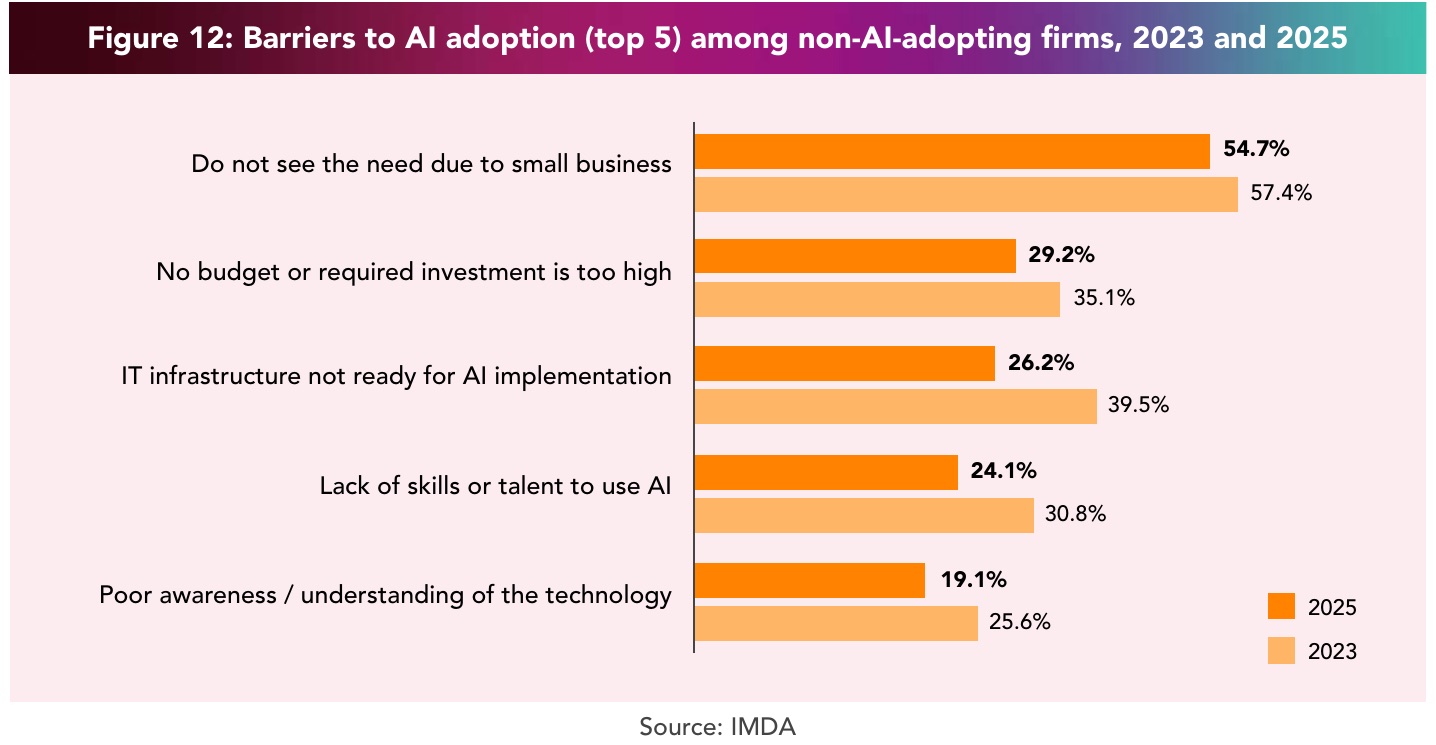
Most small businesses haven't started. IMDA's Singapore Digital Economy Report 2026 puts SME AI adoption at 23.4% for 2025, up from 14.5% the year before, and I went through the full numbers when it came out. The reason that stood out to me: among firms not using AI, 54.7% said they don't see the need because their business is small.
I don't think small is the problem. I run a business of one on this, and the whole thing is built from jobs that were each too repetitive for me to keep doing by hand.
What are examples of AI agents for business?
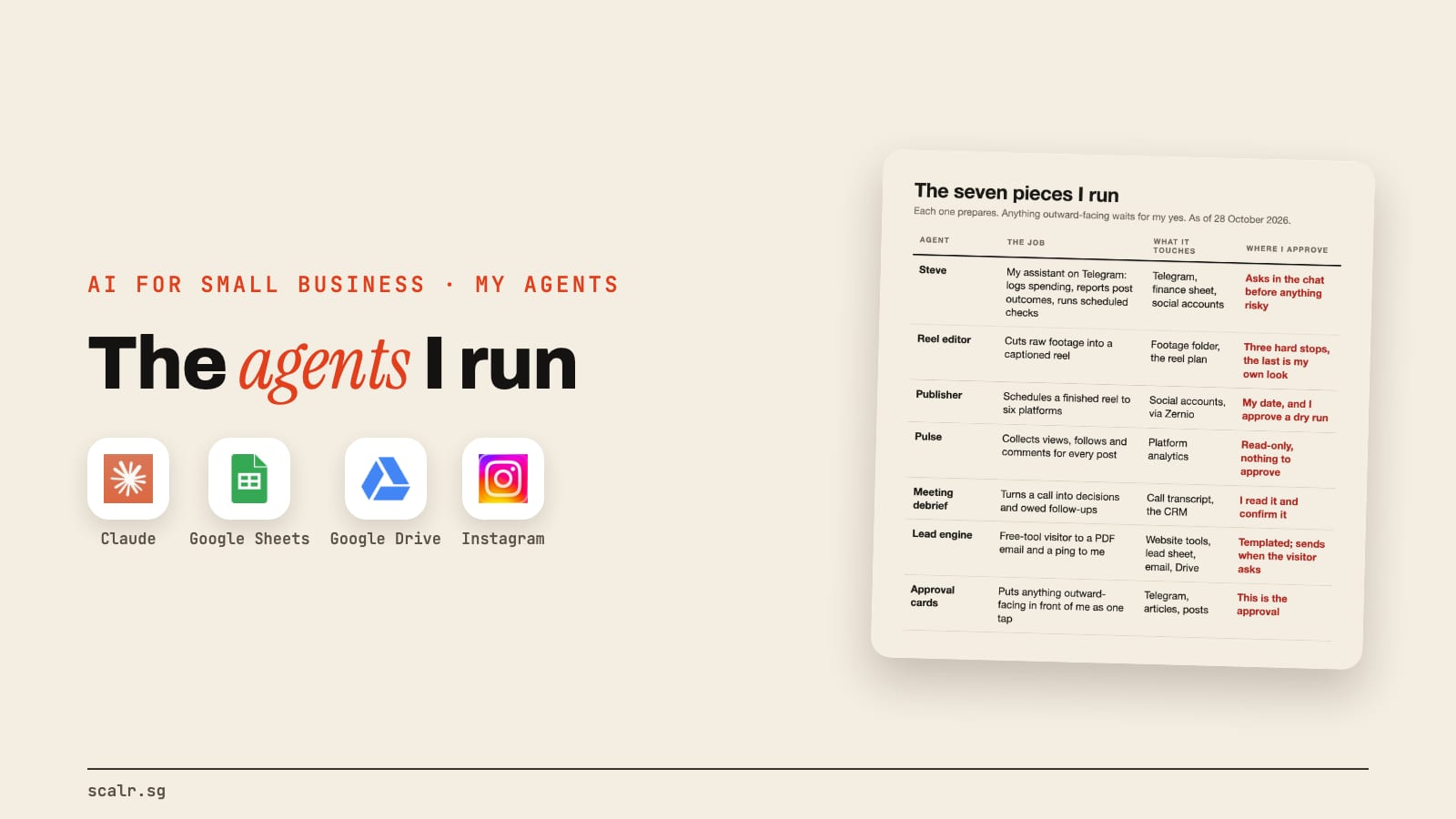
Here are the seven I run. Some are true agents that decide their own steps inside set limits, and some are plainer pipelines. I've put them in one table because the useful thing is how they connect, not any single one. The words are defined in AI vs AI agent if you want the difference.
| Agent | The job | What it touches | Where I approve |
|---|---|---|---|
| Steve | My assistant on Telegram: logs my spending, reports post outcomes, runs scheduled checks | Telegram, my finance sheet, my social accounts | Asks me in the chat before anything risky |
| Reel editor | Cuts raw footage into a captioned reel | My footage folder, the reel plan | Three stops: the clip list, caption check, my final look |
| Publisher | Schedules a finished reel to six platforms | My social accounts, via Zernio | I give the date and approve a dry run first |
| Pulse | Collects views, follows and comments for every post | Platform analytics | Read-only, nothing to approve |
| Meeting debrief | Turns a call recording or notes into decisions and owed follow-ups | Call transcript, the CRM | I read it and confirm it |
| Lead engine | Takes a free-tool visitor to a PDF email and a ping to me | My website tools, a lead sheet, email, Drive | Templated; sends when the visitor asks |
| Approval cards | Puts anything outward-facing in front of me as one tap | Telegram, articles, posts | This is the approval |
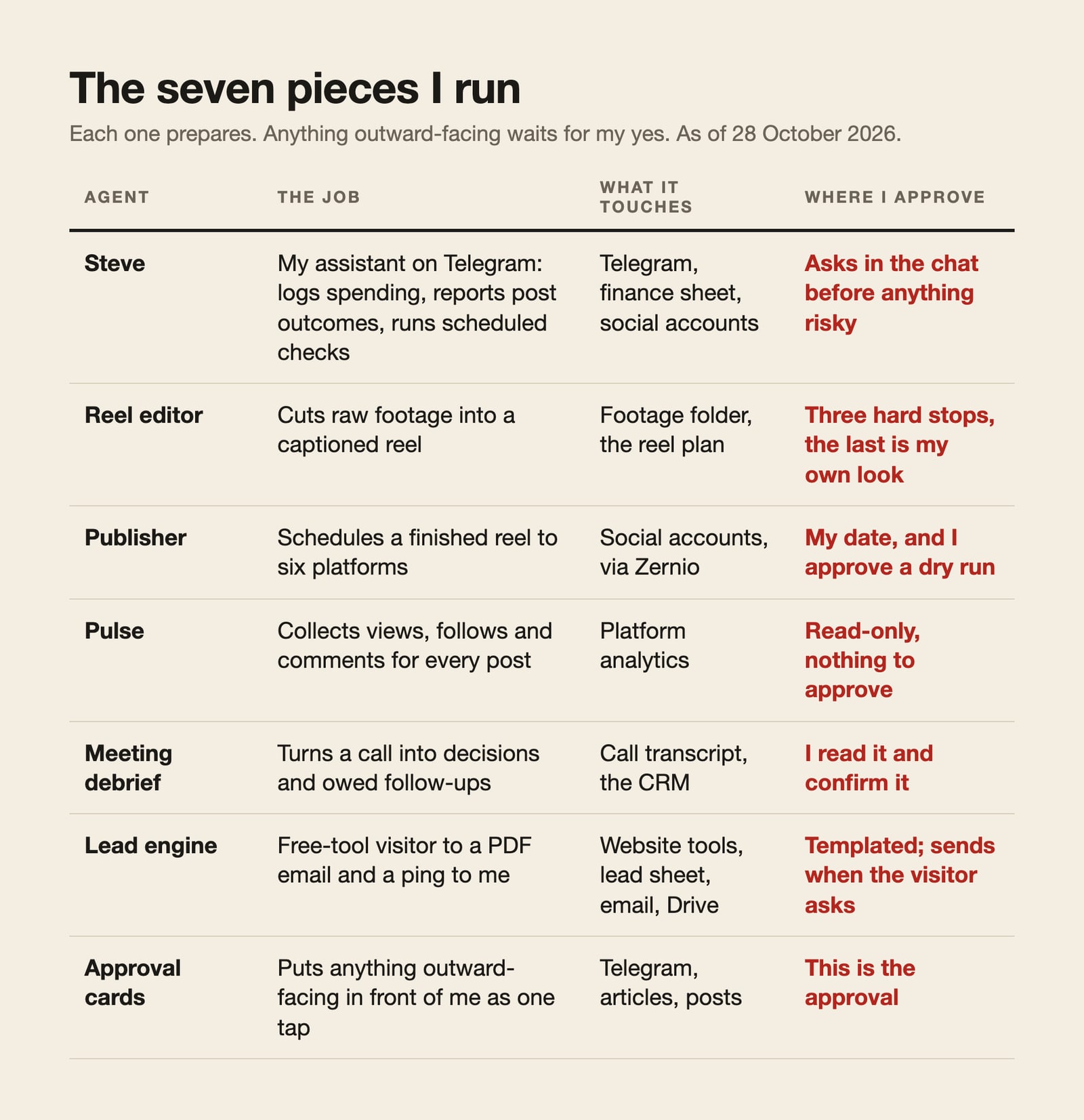
None of this is one clever tool. It's 56 skills sitting in my workspace as of 28 October, each one a written procedure Claude follows, and most of the seven run on them. If you want what a skill is, the Claude Skills guide covers it.
What does Steve do, and where does he fit?
Steve is the one I started with. He's an assistant I text on Telegram, and he runs on Hermes, a free open-source agent. His live scope is narrow: the Telegram chat, scheduled checks, notifications when posts go out, and logging spending when I tell him what I spent.
That's all I'll say here, because what he does all day has its own article. What matters for this one is where he sits. In the four levels, one agent you own is level three. Steve is mine, and everything else on the table grew around him.
How do the agents hand work to each other?
There are three chains, and each one finishes with a person, me or a visitor, at the end.
Content. I film. The reel editor cuts it, the publisher schedules it and Pulse reads the numbers back. 115 reels have a scheduling record on my disk. How my AI edits my videos walks through the editor stage by stage. This is the marketing half of my business, and it's why my answer to "AI for small business marketing" is editing, scheduling and reading the numbers back.
Leads. Someone uses one of the three free tools on this site. Their answers go into a lead sheet, a branded PDF is emailed to them, a copy is saved to Drive and I get a ping.
Sales conversations. After a call, the debrief pulls out what was decided and who owes what, then saves it to the CRM. The CRM is Attio. Anything only I can settle comes back to me as a short list to confirm, and a deal only moves stage on my yes.
That's the picture a business owner can copy without copying my setup: one trigger, a few steps, one record at the end.
Where do I approve what the agents do?
Everywhere anything leaves my desk. This is the part I'd protect first.
When something is about to publish, post or send, it lands as one dated card in a Telegram group with buttons I tap on my phone. The tap is recorded, and whatever does the work only acts on a recorded yes. An article can even publish from a server after my tap, with my laptop shut, but the tap still comes first.
The publisher has its own gate. A reel doesn't get scheduled without my date and my approval of the dry run, which is a printout of exactly what would be posted where. The editor has three hard stops, and the last one is my own look at the finished reel. Steve asks before anything risky.
There's one exception. The lead engine emails the PDF to the visitor on their request without my tap. They asked for it, the template is fixed, and the report is built from their own answers. Anything I'd call a message from me, I approve.
The rule I build to: the agent prepares, I approve. If a piece can post, send, spend or publish, a recorded yes from me sits in front of it.
What's underneath, and what's the best AI for a small business?
The roster stands on a short list of tools.
| Piece | Used for |
|---|---|
| Claude Code | The workspace: every skill and script runs here |
| Hermes | Steve, my Telegram assistant |
| Telegram | Where cards, alerts and Steve all land |
| Google Sheets and Drive | The plan, the lead sheet, the finance log, saved PDFs |
| Zernio | Scheduling to the six platforms |
| Attio | The CRM |
That's what I use. The best AI for a small business is the one that takes a job you repeat every week and stops for your approval before anything goes out. Most of my work runs on Claude, and I'm not a coder, so I describe the job and it writes the script. Using Claude Code without coding is how that works day to day, and the CLAUDE.md example shows the file that gives it my business context.
What would I tell a friend starting out?
Not much, and I'd keep it to one thing. Look at your week and ask which hours you spend on the same job over and over. Those are the ones to hand over first. If you want a number on it, the free Time-Back calculator takes the hours your team spends on seven common jobs and shows how many AI could give back, based on published research. That's how I started: the work I was repeating, not the shiniest tool.
What fits your business depends on your business. I run mine this way, and it's still a work in progress.
Key takeaways
- AI for small business, for me, is seven pieces handling repeated jobs: assistant, editing, scheduling, analytics, debriefs, a lead engine and approval cards.
- Each one ends in a place where I can say yes or no. The one exception is the templated PDF email sent when a visitor asks for it.
- The three chains are content, leads and sales conversations: a trigger, a few steps, one record at the end.
- IMDA found 23.4% of Singapore SMEs used AI in 2025, and over half of non-adopters said their business was too small to need it.
FAQ
What are examples of AI agents for a small business?
Examples from my own business: an assistant on Telegram that logs spending, an editor that cuts raw footage into reels, a scheduler that queues posts to six platforms, an analytics collector, a meeting debrief that feeds the CRM, and a lead engine that emails a PDF report to website visitors. Each prepares work and I approve anything outward-facing.
Do AI agents act without approval?
Not the ones I run, with one exception. Posts, articles, and anything sent in my name wait for my recorded yes. The exception is the lead engine's templated PDF email, which goes to a visitor only after they ask for it on one of my free tools.
What is the best AI for small business?
The best one is the one that can do a repeated job of yours and stop for your approval before anything goes outside. What I run is Claude Code for the workspace and Hermes for my Telegram assistant, Steve.
Can a small business run AI agents without coding?
Yes. I'm not a coder, and the seven pieces here were built by describing the job in plain English and checking the result. What I can't skip is judgment: deciding which jobs to hand over and what needs my yes.
How do I use AI for small business marketing?
In my case marketing means editing video, scheduling it to six platforms, reading the numbers back and following up leads from my free tools. The agents prepare each step, and I approve the date for every reel before it is scheduled.