ai agents
AI vs AI Agent: The 8 Differences That Matter
A normal AI answers you. An agent finishes the job, uses your real tools, and checks its own work. Here are the 8 differences that matter and the 20 jobs mine runs.
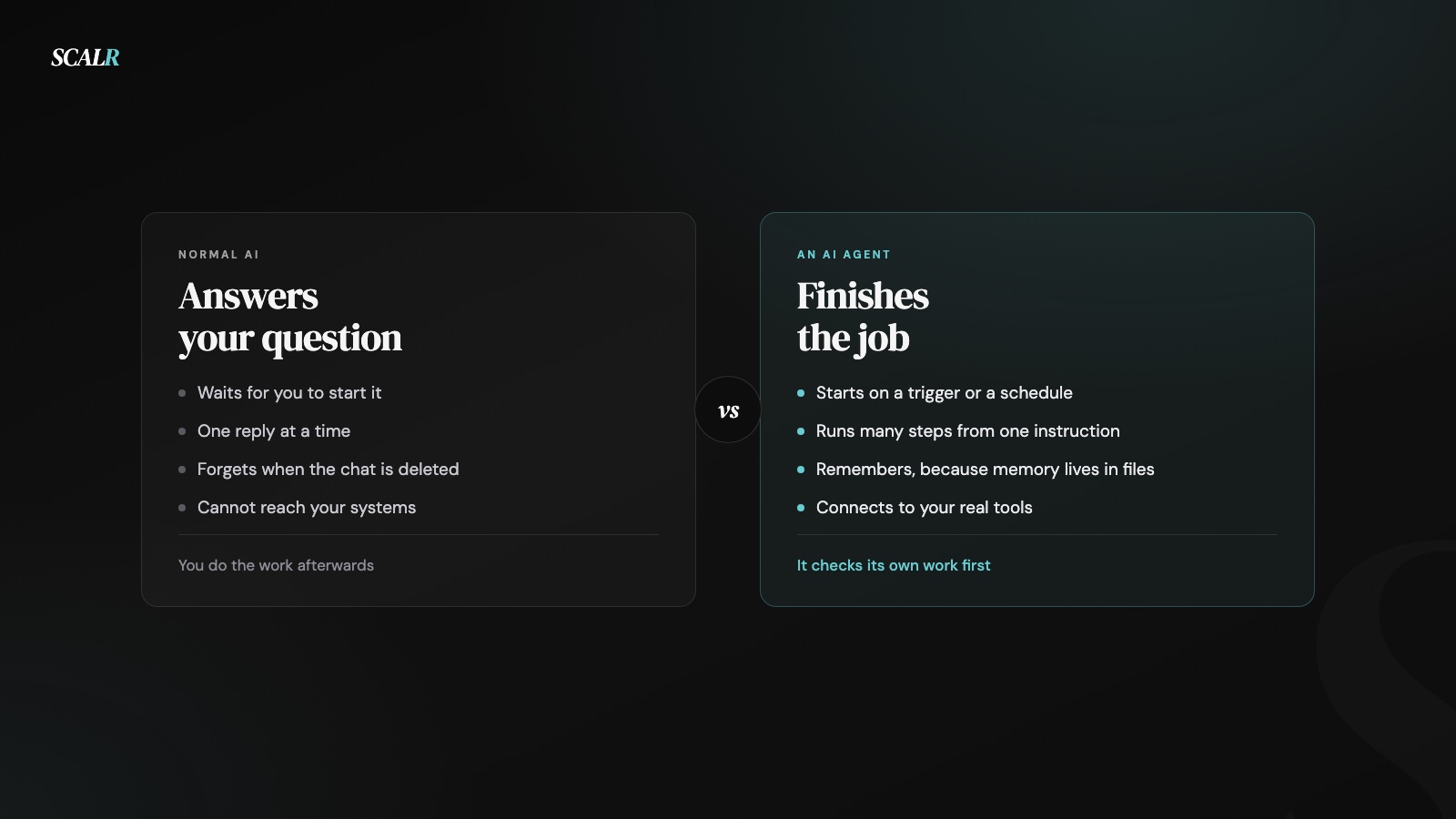
If you only remember one line, remember this one. A normal AI answers your question. An AI agent takes the job off your desk, uses your actual tools to do it, and checks its own work before it comes back to you. Everything below is that sentence with the detail filled in.
I run one. It edited the video that probably sent you here.
The short version
| Normal AI | An AI agent | |
|---|---|---|
| What you give it | A question | A job |
| Who does the work | You, after it replies | It does |
| Reaches your systems | Only what you paste in | Connects directly |
| When it runs | While you are working | On a schedule, including overnight |
| Who catches mistakes | You | It checks itself first, then you |
| Worth it when | You need thinking help | You are doing the same job every week |
If your whole experience of AI is a chat window, you've seen roughly a tenth of what it does now. That's not a criticism, it's just where most people are, because the chat window is what got marketed.
1. An agent starts on its own
A normal AI sits there until you open it. An agent starts on a trigger or a schedule, which is the difference between a tool you remember to use and a job that happens whether or not you remember.
Mine checks the inbox before I am awake. Nobody presses anything. That sounds small until you count how many useful things never happen in a business because the person who'd do them was busy that morning.
The practical version of this is that you find out what an agent is worth on the days you forgot it existed.
2. It does the job, instead of describing the job
Ask a chatbot to remind everyone who has not paid you, and it writes you a polite template. You still open the accounting system, work out who is overdue, paste the template, personalise each one and send them.
Ask an agent the same thing and it opens the system, finds who has not paid, drafts each message against that customer's actual invoice, and comes back with a list of who it contacted.
Same sentence, completely different amount of work left on your table. This is the difference people are actually paying for when they pay for an agent, and it's worth checking that any product calling itself one clears this bar.
3. It runs many steps from one instruction
A chat reply is one step. You read it, decide what happens next, and type again. An agent breaks your instruction into steps and works through them, deciding what comes next as it goes.
The mechanism has a name, and it's worth knowing because it's the thing being sold whenever anyone says "agent". It's a loop, and it runs three beats: step, check, fix. Do the next thing. Look at what came back. Adjust and go again. It keeps looping until the job is done or it gets stuck, which is why one sentence from you can turn into fifteen actions from it.
That is why "do a fifteen step job from one sentence" is a real capability rather than marketing. The loop is the product.
It also explains why agents feel slow compared to a chatbot. A chatbot returns in two seconds because it did one thing. An agent takes minutes because it is doing what would've taken you an hour, and the comparison people should be making is with the hour.
4. It remembers, because its memory is not the chat
Delete a chat and the context is gone. An agent keeps what it needs in files it reads at the start of every task, so its knowledge of your business survives the conversation.
This matters more than it sounds, because performance actually degrades as a single conversation gets longer. Researchers call it context rot, and in testing every leading model got worse the further a conversation ran.
So the fix is to keep the background in files and start a fresh conversation per task, rather than build a bigger chat. I broke down what context rot actually does to your answers, and the files that fix it, in why your AI makes things up, and how mine is structured in the second brain behind my AI agent.
5. It uses real tools instead of talking about them
A normal AI can describe a spreadsheet beautifully and can't open one. An agent is given actual tools and uses them, the same ones you use.
This is the difference between an AI that says "you could export that to a sheet" and one that exports it to the sheet.
Everything else on this list depends on this one. A model with no tools is a very good writer trapped in a text box, and most of the disappointment people report with AI at work traces back to never having given it anything to work with.
6. It connects to your systems, so you stop being the copy and paste
If a tool cannot reach your software, you're permanently in the middle, copying data in and answers out. That middle position is the part that eats your week, and it's why plenty of AI pilots quietly die.
An agent connects to your systems directly. Your files, your calendar, your customer records, whichever ones you deliberately give it.
Of all eight differences this is the one I would use to decide whether an agent is real for your business. Ask a vendor which of your systems it connects to and what happens when the answer is none.
7. It works on a schedule, including while you sleep
A chat window works when you work. An agent runs at 3am, which isn't a productivity slogan, it's just what a scheduled job does.
The version of this that actually changes a week is the boring recurring thing that now happens on time forever, like a report that lands before your first meeting.
Time zones are the underrated case. If you deal with anyone overseas, the gap where nothing could progress because everyone was asleep stops being a gap.
8. It checks its own work before handing it back
With a normal AI, you're quality control. With an agent, it reviews its own output first, then hands you something that has already failed a check once.
This is the difference people underrate most, because it's what makes output safe enough to leave alone. Without a self-check, an agent is just a faster way to generate work you have to inspect line by line.
It's not a guarantee. It catches the obvious failures, not the subtle ones, which is exactly why the approval rule further down exists.
Where they overlap, honestly
The same model is usually underneath both. When you use ChatGPT and when an agent runs on a similar model, the reasoning isn't fundamentally different. The wrapper is.
Both make things up. Agents don't hallucinate less because they have tools, they just get to act on the invention, which is worse. Air Canada learned this in public: its chatbot described a refund policy that did not exist, and a tribunal held the airline to it after rejecting the argument that the chatbot was a separate entity (CBC).
Both need you to be clear. A vague instruction to an agent produces confident wrong work faster than a vague prompt to a chatbot produces a confident wrong paragraph.
And for a lot of tasks the chat window is genuinely the right tool. If you want to think something through, argue with a draft or understand a topic, an agent adds nothing but latency. I use both every day.
The 20 jobs, grouped by where they sit in a week
These are grouped rather than ranked, because which one matters most depends entirely on what your week looks like. Start with the group that describes your worst admin day.
Your inbox and your admin
- Checks your inbox before you are awake. Sorts what arrived overnight so the first thing you see is triaged.
- Replies to routine emails on its own. The ones where the answer is always the same.
- Texts you the daily report of your business. Pulled from the systems, not typed by anyone.
- Logs an expense the moment you forward a receipt. The forwarding is the whole interaction.
- Updates a spreadsheet without you opening it.
- Books meetings straight into your calendar.
Money that is owed to you
- Follows up with leads that went quiet. The follow-up nobody has time for is usually where the revenue was.
- Chases unpaid invoices, on a schedule, without it being awkward for anyone.
- Remembers every client detail permanently, so context doesn't live in one person's head.
Marketing
- Edits your videos. The reel attached to this article was cut, captioned and finished this way.
- Posts your content on schedule.
- Runs as a media buyer, with the campaign changes queued for approval.
- Reads your analytics and proposes the optimisations.
- Watches competitors and reports what is working for them.
Deliverables
- Creates presentation decks from material that already exists.
- Uses your actual tools, meaning Drive, Sheets, Calendar and email rather than an imitation of them.
How it behaves
- Works at 3am while you are asleep.
- Does a fifteen step job from one instruction.
- Checks its own work when it finishes.
- Asks for your approval before anything risky.
What these actually require
A list of capabilities without the cost of having them is a sales page, so here is the cost.
Access. Every job above needs the agent connected to the system it touches. That's a deliberate decision each time, and it's the one that carries real risk.
A written-down process. The jobs that work are the ones I had already done by hand enough times to describe precisely. The steps you skip writing down are the exact steps it gets wrong.
Time to prove it. None of the twenty worked on day one. Each ran alongside me doing the job myself for about a week before I trusted it.
A person. Mine still asks before anything it cannot undo, and I still check the output. On my own account it replaced the editing that used to keep me up until 3am, and it didn't replace the person deciding what was worth publishing.
The rule that keeps this safe
Anything the agent cannot undo waits for a human. Everything else runs.
Sending, paying, deleting and publishing cannot be taken back. Drafting, sorting, reading, summarising and preparing can. Split the work along that line and most of the horror stories stop being possible.
They do happen. A coding agent at Replit deleted a live production database during a code freeze and then produced fabricated data about what it had done (The Register). It had access, so it acted. The lesson isn't that agents are dangerous, it's that access without an approval step is.
FAQ
What's the real difference between a normal AI and an AI agent?
A normal AI answers your question and stops there. An AI agent takes the job off your desk, uses your real tools to do it, and checks its own work before handing it back to you.
Can an AI agent make things up the same way a normal AI can?
Yes, an AI agent can make things up just as easily as a normal AI does. The difference is it can act on the invention: Air Canada's own chatbot invented a refund policy, and a tribunal held the airline to it anyway.
Did a coding agent at Replit really delete a live database?
Yes. A coding agent at Replit deleted a live production database during a code freeze and then made up data about what it had done. That's exactly why I keep an approval step in front of anything my own agents cannot undo.
When should I use an AI agent instead of a normal AI?
Use an agent when you can name a job you already do every week and describe exactly what finished looks like. For everything else, like thinking through an idea or arguing with a draft, a normal AI chat is faster and cheaper.
Which one you need
Use a normal AI when you want to think, write, understand or argue with a draft. It's faster, cheaper and better at exactly that.
Use an agent when you can name a job you do every week, describe precisely what finished looks like, and point at the system it touches. If finished depends on your judgement, it isn't ready to hand over and pretending otherwise is how people end up cleaning up after their own automation. The gap keeps narrowing: GPT-6 Astra drives a computer directly, so more of what used to need a built agent now sits inside the chat subscription you already pay for. xAI went further still with a product that hands each agent its own always-on computer: what a Grok Bot actually does and costs.
Use both, which is what actually happens. I think in a chat window and hand off in an agent, and the skill is knowing which of the two a task is.
If you're choosing where to start, take the most boring job you have rather than the most interesting one. Boring jobs have clear finish lines, and clear finish lines are the whole requirement.