AI tools
Paperclip: The Free Tool That Gives Your Business a Team of AI Employees
Paperclip is a free, open-source app that runs a team of AI agents like a small company: one goal, a CEO and its hires, a budget for each, and your sign-off on the big calls. Here is the link, the real setup steps, and the three jobs I'd give it first.
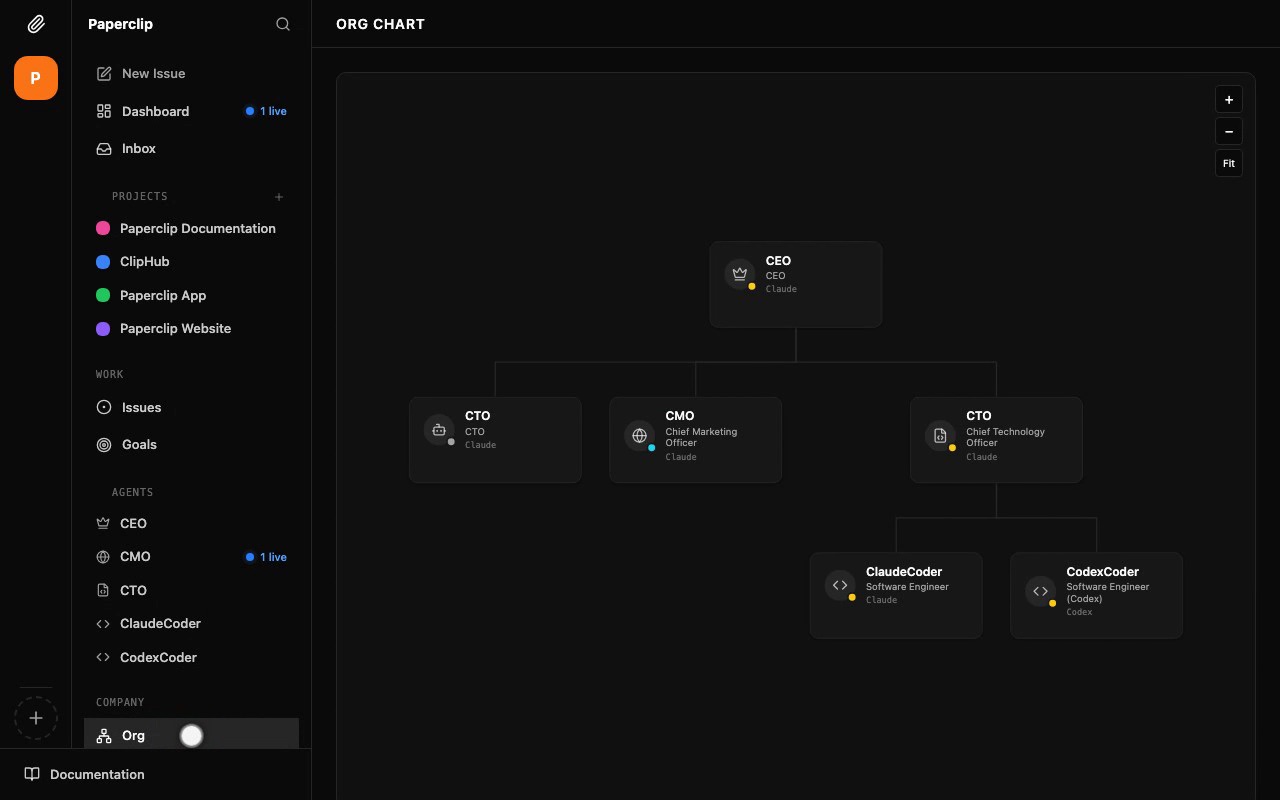
Paperclip is a free, open-source app that lets you run a team of AI agents the way you'd run a small company. You write down one goal, hire AI "employees" into roles like CEO, marketer and engineer, give each of them a monthly budget, and the big decisions wait in a queue until you approve them. Under the dashboard it's basically an org chart, a budget sheet and an approval queue for AI agents, laid out like a task manager.
The link is github.com/paperclipai/paperclip. It's MIT licensed, the repo only went up on 2 March 2026, and when I checked on 6 October it had 97,879 stars. The README sums it up in one line: "If OpenClaw is an employee, Paperclip is the company." If you missed how OpenClaw rose and fell this year, I wrote up the whole arc.
How I looked at Paperclip
I haven't run Paperclip on my own business yet, so here's where everything below comes from. I read the README end to end, worked through the official documentation at docs.paperclip.ing, and checked the repo's live numbers on 6 October 2026. Every screenshot on this page is from Paperclip's own demo company, published by the Paperclip team, not my setup.
What I bring is the other side of it. I already run my own business work through an AI agent, and the thing that took me longest to get right had nothing to do with how clever the agent was. It was deciding who's allowed to do what, how much they can spend, and what has to come past me before it leaves the building. So that's what I read these docs for, and it's where this piece spends most of its time.
Paperclip at a glance
| Question | Answer |
|---|---|
| What it is | A Node.js server and web dashboard that organises AI agents into a company |
| Price | Free and open source, MIT licence |
| What you actually pay for | The AI models your agents run on, billed to you by the provider |
| Where it runs | Your own computer or server. A hosted Paperclip Cloud is waitlist only |
| What you need first | Node.js 24.11 or newer, plus an Anthropic or OpenAI API key |
| Works with | Claude Code, Codex, Cursor, Gemini CLI, OpenClaw, OpenCode and more |
| The gotcha | Budgets cap the spend, but you still fund every token the agents use |
How does Paperclip work?
The README lays the flow out in three steps: define the goal, hire the team, approve and run. They're the same three steps from the reel, but each one has more going on underneath than a 25-second video can show. So I'll take them one at a time, and give budgets their own section, because that's where most of the safety sits.
Step one: you give Paperclip a goal
A goal in Paperclip is an outcome statement, the thing the company is trying to achieve. Getting your first 100 customers is a goal. Launching a new product is a goal. The goals guide calls them the "why it matters" layer. They sit above projects and tasks, and every project links back to the goal it's advancing, so an agent picking up a task can see why it exists in the first place.
Two details I liked here. Goals can nest, so "get 100 customers" can sit above a smaller sub-goal like "get the first 20 through referrals". And Paperclip deliberately doesn't invent a progress percentage. A goal's status is set by a person, or by the CEO agent once it's clearly hit or dropped, and you judge how it's going by how the projects under it are moving. I'd take that over a progress bar that's guessing.

Step two: you hire the team
Hiring starts with one agent, the CEO, and you create that one yourself. Each agent gets a name, a role, someone it reports to, and what Paperclip calls an adapter, which is just the AI tool doing the thinking, like Claude Code or Codex. The README's own list of roles is "CEO, CTO, engineers, designers, marketers," followed by "any bot, any provider," which means you can mix them. The org chart at the top of this page has a CEO running on Claude with one of its engineers running on Codex, in the same company.
After that first hire, the CEO does the hiring. When it decides it needs a marketer, it can't just create one. It has to submit a hire request, which lands in your queue with the proposed role, the AI that would power it, who it reports to and the monthly budget it's asking for. You approve it, reject it or send it back for changes. And you can always skip the CEO and add agents yourself, and there's a catalog of ready-made teams you can install with the roles, skills and routines already set up.

How do Paperclip's budgets stop an agent overspending?
Budgets come in three layers, according to the costs and budgets guide. There's a monthly ceiling for the whole company, a separate monthly ceiling for every agent, and an optional lifetime cap on a project. Their own example of that last one is a project that "can never cost more than $200". The per-agent ceiling is enforced on its own, so one runaway agent gets paused even while the company as a whole still has money left.
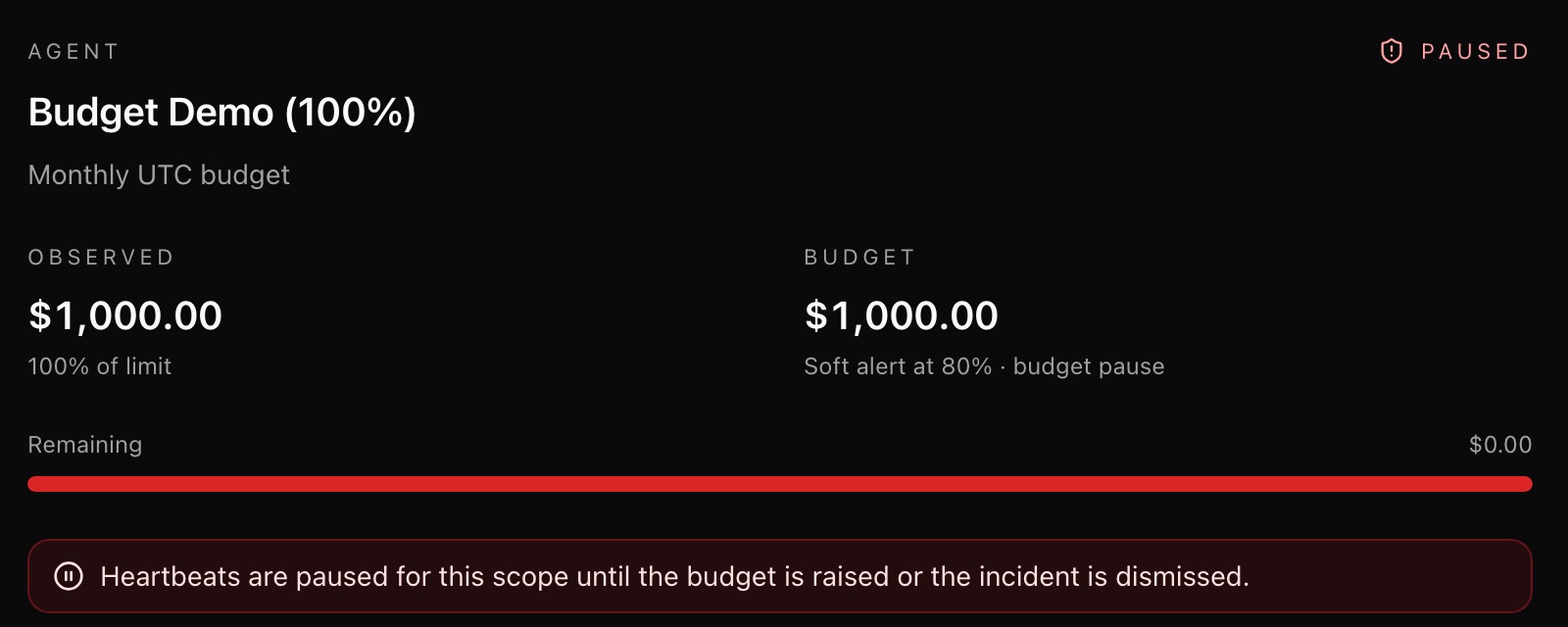
When an agent reaches 80% of its budget, Paperclip records a warning and lets it keep working, so you have time to step in. At 100%, the agent is paused automatically and stops waking up until you raise the budget or the month resets. It keeps its unfinished tasks for when it comes back.
The README is upfront that this runs on recorded spend, and that usage reporting and work already in flight "can delay a stop." So I'd treat the cap as a brake with a little travel in it, and set it comfortably below the number I'd actually be upset to lose.
What does Paperclip make you approve?
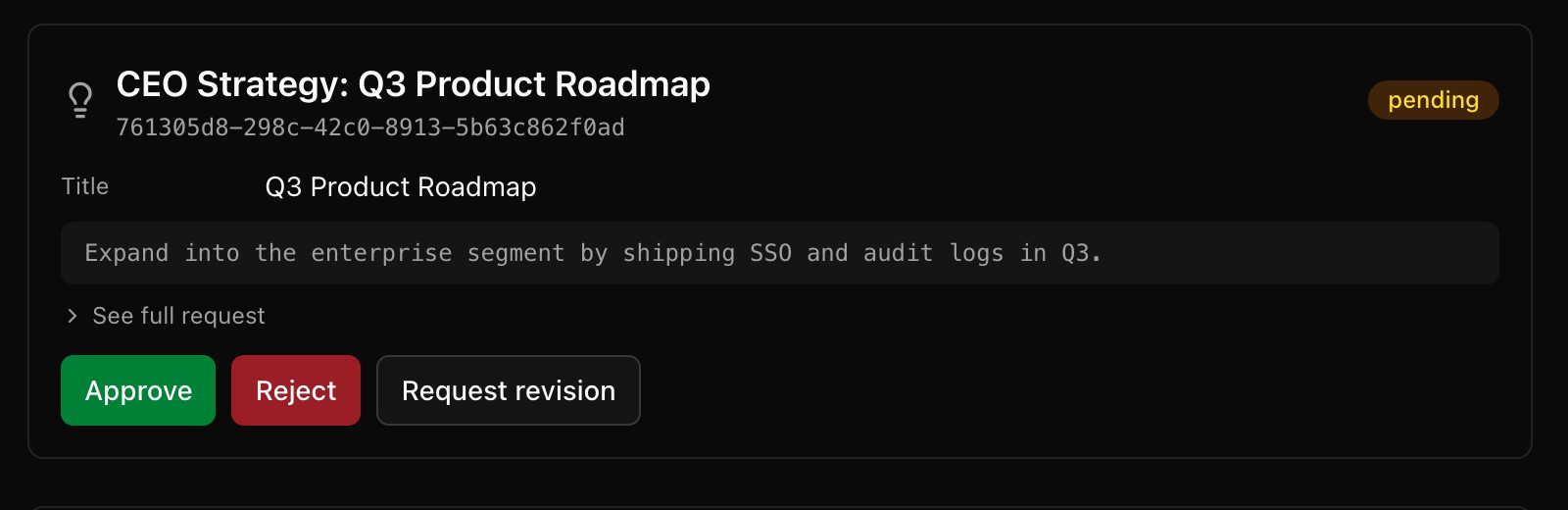
The docs describe approvals as your board seat, where the agents run the day to day and the big calls still come to you. Out of the box, three kinds of approval land in your queue. The first is hire requests, covered above. The second is the CEO's strategy, which the docs call the most important approval you'll see. After its first run, the CEO writes a plan for hitting your goal, and it can't move a single task to "in progress" until you've approved that plan. The third is budget overrides, for when an agent hits its hard stop and needs you before it carries on.
Every approval gets the same three buttons, Approve, Reject and Request revision, and the approvals guide recommends the third more often than you'd expect. If the CEO's plan is heading the right way but leans too hard on the wrong thing, a specific note sends it back to rework the plan instead of throwing it out and starting over.
There's one more layer to know about before you connect anything real. The approval queue covers the big decisions inside the company, but whether an agent can actually send an email or post somewhere is set per connection. When you connect an outside service like a Gmail inbox, GitHub or Notion, each action can be set to Allowed, Ask first or Off. For anything that reaches a customer, I'd set it to Ask first, and that's what makes "nothing goes out until you approve it" hold in practice. You also keep the override powers the whole time, so you can pause, resume or terminate any agent, or hand its task to someone else, without waiting on a queue.
How do you install Paperclip?
Paperclip is a Node.js server you run yourself, on your laptop or on a server you control, and the quickstart is one command. You need Node.js 24.11 or newer first, which you can check by typing node --version in a terminal. Then:
npx paperclipai@latest onboard --yesThat boots a local instance with its own built-in database, so there's no separate database to set up and no Paperclip account to create. From there, the quickstart path takes about five minutes across three steps.
- Create your company. Give it a name, then add your goal.
- Hire your first agent. That's the CEO. For the Claude route you need an Anthropic API key and Claude Code installed on the same machine, and for the Codex route you need an OpenAI key.
- Watch it work. The CEO's first heartbeat fires, it writes a strategy, and the strategy waits in your approvals queue. Approve it and the first tasks land on the board.
A heartbeat is Paperclip's word for an agent waking up to check for work. The docs' own advice, which I'd follow, is to set your company and per-agent budgets before you switch heartbeats on.
If you'd rather test it without touching anything permanent, there's a test-drive command that spins up a throwaway instance with a CEO already hired.
ANTHROPIC_API_KEY=your-key-here npx paperclipai test-driveTwo more things before you run it. Paperclip collects anonymous usage telemetry by default, and setting PAPERCLIP_TELEMETRY_DISABLED=1 turns it off. And if you'd rather not run a server at all, the hosted version, Paperclip Cloud, is rolling out gradually through a waitlist. The installation guide covers the permanent install, updates and rollback if you decide to keep it.
What does Paperclip cost to run?
Paperclip itself costs nothing, but the agents do. Every time one wakes up, it sends text to Anthropic or OpenAI, and that provider bills you per token directly. The costs guide is clear that this isn't a Paperclip fee.
The docs' own estimate is US$5 to US$20 to play with the product, and US$20 to US$100 a month once a company is active. For a single, moderately busy worker agent on Anthropic's pricing, they put it at roughly US$3 to US$15 a month, and they're careful to say that swings a lot with the model and how much context each task carries. The README's own list of the problems Paperclip solves includes runaway loops that "waste hundreds of dollars of tokens," which is exactly why the budgets exist and why I'd set them first.
Three jobs I'd give Paperclip first
If I were setting this up for a small business, I'd start with jobs where a bad draft costs nothing because I'm reading it anyway. And I'd keep the team to the CEO plus one hire, so the org chart stays small enough to actually follow.
- A weekly numbers report. Paperclip's routines create a task on a schedule and wake the agent assigned to it, and reports are one of the recurring jobs the README names. Have one agent pull last week's sales, enquiries and ad spend from the sheets you connect into a single summary every Monday morning. It's read-only and dull, and within a week or two it tells you whether the agent's output is worth trusting.
- A week of content drafts. Give a marketer agent your goal and a short brief, and have it draft next week's posts or emails as tasks you review. With publishing left on Ask first, nothing reaches a customer until you've read it. That's the same split I use with my own agent, where it prepares the work and I sign it off.
- A one-off research project with a lifetime cap. Something like a list of 30 businesses that fit your ideal customer, or a scan of what your competitors charge, set up as a project with a lifetime budget so it can't cost more than you decided up front. It's also the cleanest way to watch how the CEO breaks a goal into tasks without putting a monthly bill on the line.
I'd pick one of the three, not all of them at once, and only add the next once the first has run cleanly for a couple of weeks.
What gives me pause about Paperclip
Paperclip is clearly built for people who are already juggling agents. The README's own "right for you if" list includes having "20 simultaneous Claude Code terminals" open and losing track of what each one is doing. If you've never handed a single job to one agent, I'd start there first, and I wrote about what separates an agent from a chatbot if that's where you are.
The pitch also leans hard on autonomy, with lines about "autonomous AI organizations" and agents running "24/7". I'd treat that as where it can go eventually rather than how I'd set it up on day one, so in the first month I'd lean on the approvals and the budgets.
Connecting outside services is newer ground, too. The connectors guide says Paperclip hasn't finished Google's app verification yet, so connecting a Gmail inbox can show an unverified-app warning, and the option to continue past it isn't offered on every account.
Running it yourself also means the uptime and the safekeeping of your API keys are on you. If installing Node.js and typing commands into a terminal isn't something you want to do, I'd skip the self-hosted version and get on the Cloud waitlist instead.
FAQ
Is Paperclip free to use?
Yes. Paperclip is free and open source under the MIT licence. The agents inside it run on AI models from providers like Anthropic or OpenAI, which bill you per token directly, so running a team still costs money. Paperclip's own docs estimate US$5 to US$20 to try it out and US$20 to US$100 a month for an active company.
Do you need to know how to code to use Paperclip?
You don't write code to set goals, hire agents or approve their work in Paperclip, since all of that happens in its web dashboard. You do need to be comfortable installing Node.js 24.11 or newer and running one command in a terminal, because Paperclip runs on your own machine until the hosted Paperclip Cloud opens up beyond its waitlist.
Can Paperclip agents act without my approval?
Paperclip's agents need your approval for new hires, for the CEO agent's strategy and for budget overrides, and the CEO can't start working its tasks until you've approved its plan. For outside services such as email or GitHub, each action can be set to Allowed, Ask first or Off, and anything that reaches customers should be set to Ask first.
How many GitHub stars does Paperclip have?
Paperclip had 97,879 stars on GitHub when I checked on 6 October 2026, about seven months after the repository went up on 2 March 2026.
Which AI tools work with Paperclip?
Paperclip's README lists Claude Code, Codex, Cursor, Gemini CLI, OpenClaw and OpenCode among the agents it can manage, and you can mix them inside one company. Its own rule of thumb is that anything that can receive a heartbeat, Paperclip's word for a wake-up call to check for work, can be hired.
Where Paperclip sits next to MiroFish
Last month I wrote about MiroFish, the free tool that runs a crowd of simulated customers through your launch before you post it. Paperclip sits at the other end of the same job. MiroFish helps you decide what to do, and Paperclip is built to carry the work out afterwards with a team that has a goal, a budget each and a queue of decisions waiting for you.
What made me read Paperclip's docs end to end was how much of them is about limits and sign-off rather than how capable the agents are. In my opinion, that's what any tool like this has to get right before I'd let it anywhere near a customer.