AI tools
VoiceStudio: Clone Your Voice for Free on Your Own Laptop
VoiceStudio is a free, open-source app that clones your voice and dubs your videos on your own computer. The download link, the setup, the three steps, the dubbing, and where it actually fits in a business.
There's a free app on GitHub called VoiceStudio that does the job most people pay a voice subscription for. You give it a short recording of your voice, you type what you want said, and it reads it back in your voice, all on your own computer. It can also take a video you've already made and dub it into another language in that same voice.
It's VoiceStudio on GitHub, built by Palash Debnath, and it had more than 54,000 stars when I checked on 6 October. Its own description calls it "the open-source, fully-local ElevenLabs alternative", covering voice cloning, voice design, video dubbing, dictation, transcription and audiobook creation in 646 languages.
How did I check VoiceStudio?
I haven't put my own voice through it yet, so this piece isn't a verdict on how natural the clone sounds. What I did was read everything that decides whether it's worth an afternoon of your time: the README, the install guide for each platform, the licence notice, the Pro pricing page, the latest release, and the model card for the speech model it runs by default. Every app screenshot on this page is VoiceStudio's own, from its README, and the star count comes straight from GitHub.
The default model behind it has a free demo on Hugging Face, which is the quickest way to judge the voice quality before installing anything. Bear in mind that the demo runs in the cloud, so whatever sample you give it gets uploaded, which is the exact thing the desktop app avoids.
| Question | VoiceStudio |
|---|---|
| What it does | Voice cloning, voice design, video dubbing, dictation, transcription, audiobooks |
| What it costs | Free and open source (AGPL-3.0); an optional Pro build is US$99 a year |
| What it runs on | Apple Silicon Macs, Windows and Linux; Intel Macs run the interface only |
| Disk space | About 10 GB on a Mac for the app, its Python setup and the models |
| Languages | 646 for speech, per the repo |
| The catch | The default voice model's weights carry a non-commercial licence |
Where do you download VoiceStudio, and how do you set it up?
There are two routes, and both come straight from the README.
On a Mac or Linux machine, the one-command install pulls the latest release and sets it up for you:
curl -fsSL https://voicestudio.sh/install | shOn Windows, the equivalent is one line in PowerShell:
irm https://voicestudio.sh/install | iexThe other route skips the terminal entirely, with an installer from the VoiceStudio releases page: a .dmg for Mac, an .exe for Windows, and an .AppImage or .deb for Linux. The latest when I checked was version 0.5.6, published on 23 September. On a Mac, pick the file with arm64 in its name if you're on an M-series chip.
The first launch is the slow one. Per the macOS install guide, the app sets up its own Python, FFmpeg and model weights the first time it opens, and the voice models download from Hugging Face the first time you use them, so give it an internet connection and some patience. It wants macOS 13.3 or newer and roughly 10 GB of free disk. After that, the cloning and dubbing run on your machine.
What speed you get depends on your hardware. Apple Silicon Macs get Metal acceleration and NVIDIA cards on Windows or Linux get CUDA, while a machine with no dedicated graphics card still works on the CPU, just slower. Intel Macs are the exception: the guide says PyTorch stopped shipping Intel Mac builds, so the local engine can't install there, and the app only runs as an interface pointed at a backend on another computer.
Anyone already working in Claude Code or a similar coding agent gets a third option. The README gives you a prompt to paste in, and the agent handles the install, checks your hardware and runs a test generation for you.
How do you clone your voice in VoiceStudio?
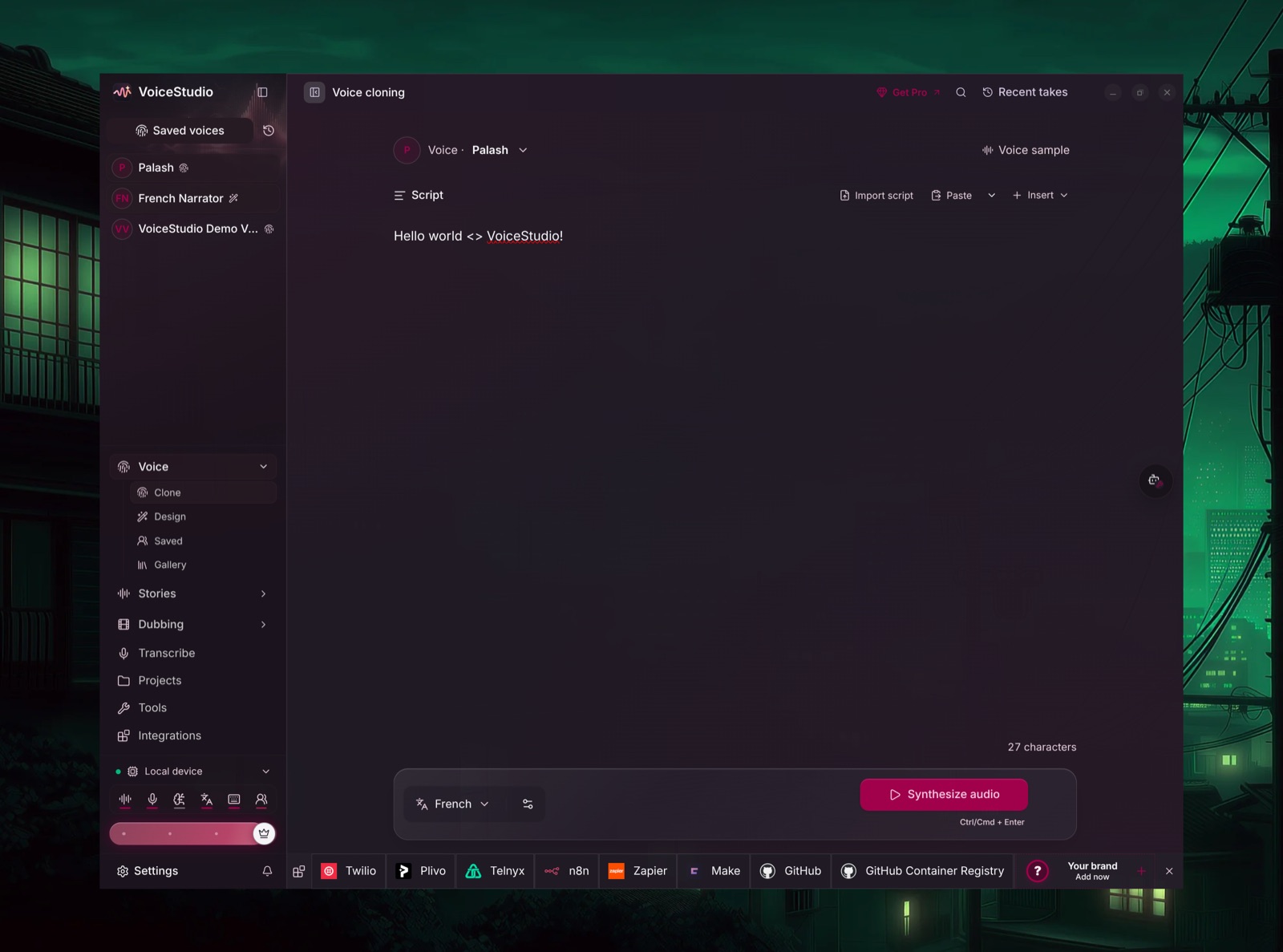
The three steps I described in the reel map straight onto the Voice cloning screen.
First, you record a short sample of your voice. Open Voice cloning and add a reference recording through the Voice sample control at the top right. The model's own card says it clones from "a short reference audio", and the one thing the README asks is that the recording is clean, so do it somewhere quiet with the mic close.
Then you type whatever you want it to say into the Script box, or bring a script in with Import script or Paste.
And it reads it back in your voice. Pick the output language, press Synthesize audio, and install the model when it prompts you the first time. Your voice then sits in the Saved voices list, so the next script is just a type-and-generate job.
Voice design covers the case where you'd rather not clone anyone, building a new voice from a description instead. The model card lists the attributes it understands, including gender, age, pitch, accent and even whispering.
Can VoiceStudio dub a video into another language?
Yes, and for a lot of businesses this is the more useful half. In the Dub workspace you drop in a video or audio file (MP4, MOV, MKV, WEBM, MP3, WAV, FLAC or M4A all work) or paste a YouTube link, and it runs three stages: it transcribes what was said, translates it, then speaks the translation back in the speaker's voice, timed against the original.
The part I like is that you see every line before anything gets generated. Per the dubbing docs, the editor shows the source text next to an editable translation, so you can fix a product name or a phrasing that came out wrong before the voice ever says it. If you already have a translation you trust, from a human translator or a subtitle file, there's a Paste Translation option that maps it onto the timeline without re-transcribing.
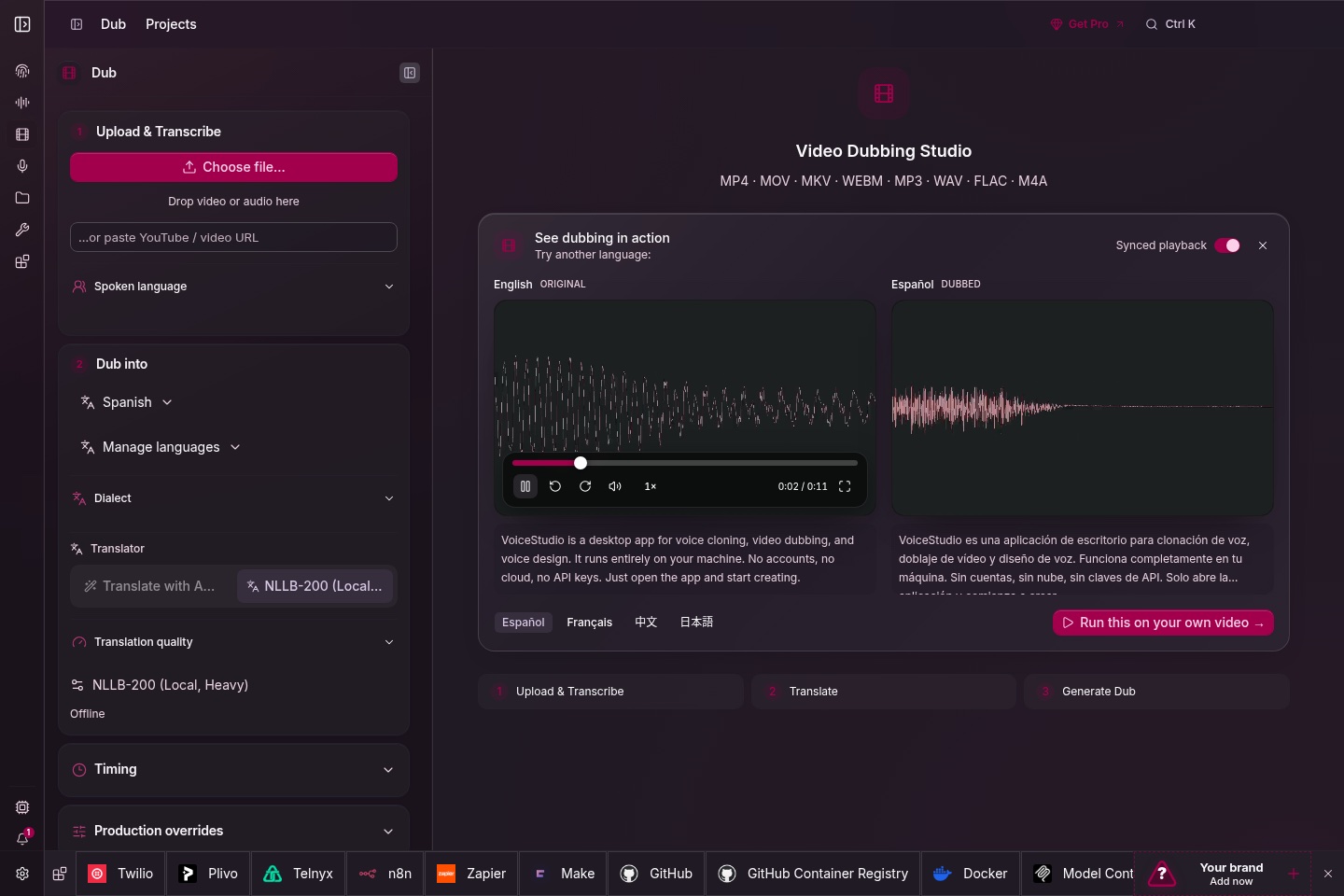
Translation is where you choose how local you want to stay. Two engines come built in and work offline, Argos and NLLB-200. Google Translate, DeepL, Microsoft Translator and any OpenAI-compatible model are optional extras, and those send your transcript text out to their servers, so if the video is sensitive, stay on the offline pair. The 646 figure is the count for the speech side, while the translation step uses its own engine with its own language list, so check the language pair you need before you plan a project around it. For a Singapore business, Mandarin, Malay, Tamil and Cantonese are all on the speech model's published language list.
Is VoiceStudio really free, and what is the Get Pro button?
You'll spot a Get Pro button in the top bar, and it's fair to ask what it's selling. Pro is a separate, closed-source build at US$99 per user a year or US$299 for a lifetime licence. It adds more devices per seat, remote devices, early access to new features, and a commercial licence for paid client work.
The core app doesn't need it. VoiceStudio's own feature comparison lists voice cloning, voice design, video dubbing, dictation, transcription, audiobooks and the local API in the free build, with no account and no cloud required. The README says the same thing in its own words: "Local workflows run on your hardware. Remote services are optional; usage analytics requires consent." The remote GPU workers are opt-in, and analytics stays off until you agree to it. So the cloning and dubbing run locally, for free, without touching any of the paid or remote parts.
What should a business actually use VoiceStudio for?
The subscription was never the real cost of voiceovers. The cost was the hour you lose re-recording every time one line in a script changes, and that's where a local clone earns its place. These are the uses I'd start with:
- Fixing one line without re-recording. Your explainer video says last year's price, or a product name changed. Type the new line, generate it in your voice, and drop it over the old one.
- Training and SOP videos. Write the walkthrough once, voice it in the owner's voice, and when the process changes you edit the script instead of booking another recording session.
- Dubbing a demo for a second market. One product video, re-voiced into Mandarin, Malay or Tamil in the same person's voice, for the audiences a Singapore business already serves.
- Turning written guides into audio. The audiobook workspace takes long text, so a guide you've already written can become something people listen to on the commute.
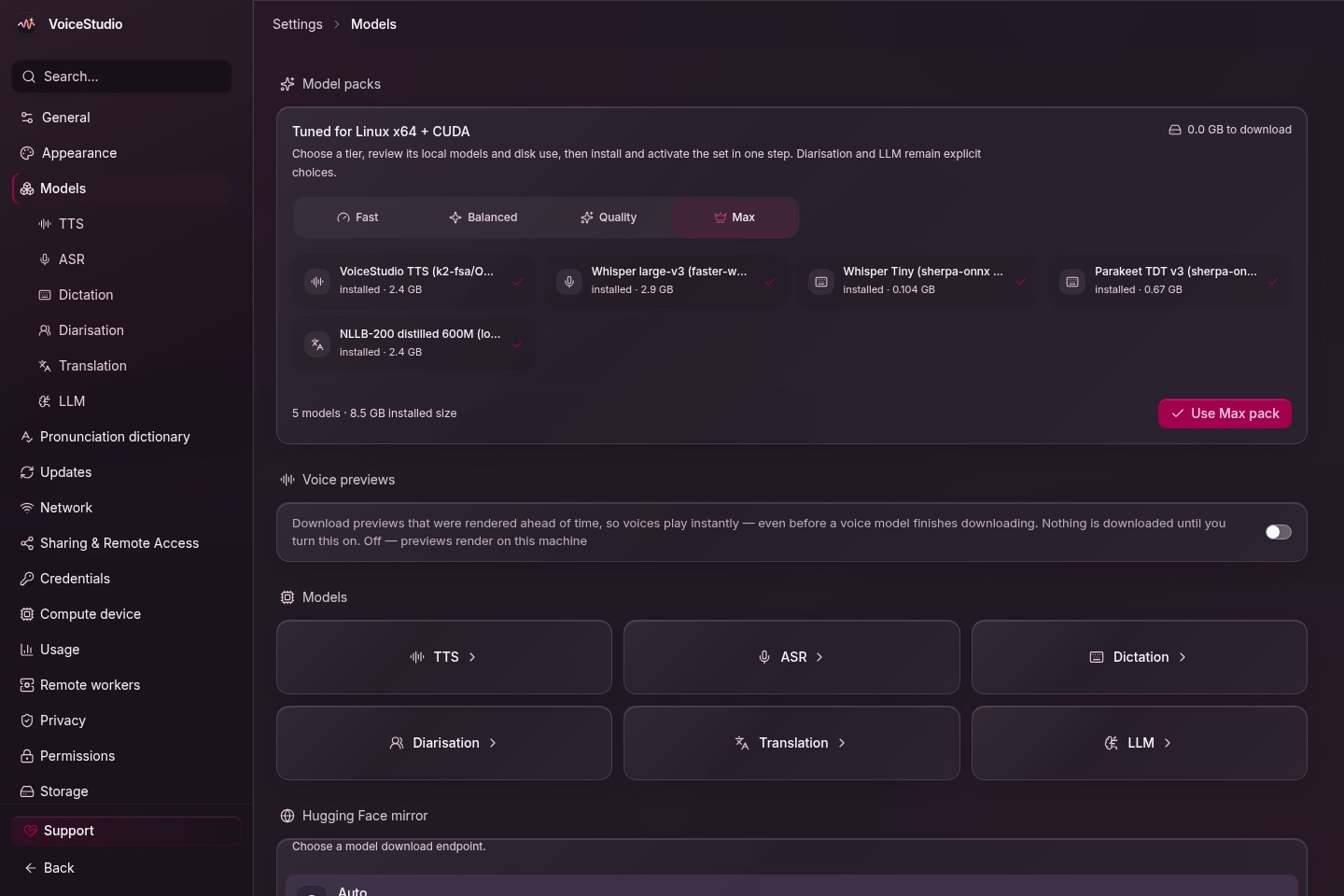
Before any of that goes into paid work, read the model licence. VoiceStudio's licence notice says the app itself is AGPL-3.0 and free for commercial and internal business use, but the model weights are a separate matter. The default speech model, OmniVoice from k2-fsa, releases its code under Apache 2.0 and its pretrained weights under CC-BY-NC, a non-commercial licence, because of what it was trained on. The notice is explicit that even VoiceStudio's paid commercial licence doesn't replace the model's own terms, and the README tells you to review each model's licence before commercial use. A paid ad voiced with the default model is the clear case to avoid, so for client work, pick an engine whose licence covers it or clear the terms first.
The other rule is the repo's own line, and I'd hold to it: "Clone voices only with permission." Start with your own voice. The model card goes further and prohibits impersonation and unauthorised cloning outright, and VoiceStudio's privacy settings include an invisible watermark option that marks generated audio as synthetic when it's available on your setup.
Who should skip VoiceStudio?
If you're on an Intel Mac with no other machine to run the engine on, this won't work for you as a local tool. If your team needs a shared cloud workspace with logins and a support line, a hosted service still fits better. And if you need finished voiceovers for a paying client this week, the licence check above comes first, which probably means a different engine or a hosted product with commercial terms already settled.
FAQ
Is VoiceStudio free to use?
Yes. VoiceStudio is open source under the AGPL-3.0 licence, and the free build includes voice cloning, voice design, video dubbing, dictation, transcription and audiobook creation. The optional Pro build costs US$99 per user a year and mainly adds more devices, remote devices, early access and a commercial licence for client work.
Does VoiceStudio upload my voice to the cloud?
No. VoiceStudio's README says local workflows run on your own hardware, remote services are optional, and usage analytics only runs with your consent. The models download from Hugging Face the first time you use them, and the online translators in the dubbing tool send text out, but the built-in offline translators keep everything on your machine.
Does VoiceStudio run on an Intel Mac?
Only the interface does. PyTorch no longer ships Intel Mac builds, so VoiceStudio's local engine can't install on an Intel Mac, and the app has to connect to a backend running on another computer. Apple Silicon Macs on macOS 13.3 or newer run it fully locally.
How many languages does VoiceStudio support?
VoiceStudio's repo says 646 languages for speech, through its default OmniVoice model. Dubbing also depends on the translation engine you choose, such as the offline Argos or NLLB-200 translators, and each engine has its own language list.
Can I use VoiceStudio voices in paid client work?
The VoiceStudio app is free for commercial use under AGPL-3.0, but the default OmniVoice model's weights are licensed CC-BY-NC, which is non-commercial. Check the licence of whichever speech model you use before voicing anything for a paying client, and only clone voices you have permission to use.
The order I'd set it up in
Install the release for your machine and let the first-run downloads finish. Clone your own voice from a clean sample, run it on a short internal script, and listen back properly before you trust it. Then dub a one-minute clip with the offline translator and read every line in the editor before you generate. Only after both feel right would I think about client work, and that's the point where you check the model licence. If you're putting together a free video toolkit, it pairs well with the free Opus Clip alternative on GitHub, and if you want to see how far a self-run video pipeline can go, I wrote up every stage my AI runs to edit a video.