claude code
Claude Code Hooks and Subagents: What They Are and When I Use Each
Claude Code hooks are shell commands that run automatically and can block an action. Subagents are separate Claude workers with their own tools. Here are mine, in plain words, with the file excerpts and a table for choosing between them.
A Claude Code hook is a shell command that runs automatically at a set moment, such as before a command or after a file is edited, and it can block the action. A subagent is a separate Claude worker with its own context window, its own tools and its own instructions, which does a side job and hands back a summary. Hooks enforce. Subagents delegate.
I run three hooks and a handful of subagents in my own workspace. This is what each one does, how they work underneath, and how I decide which of the two a problem needs.
What is a Claude Code hook?
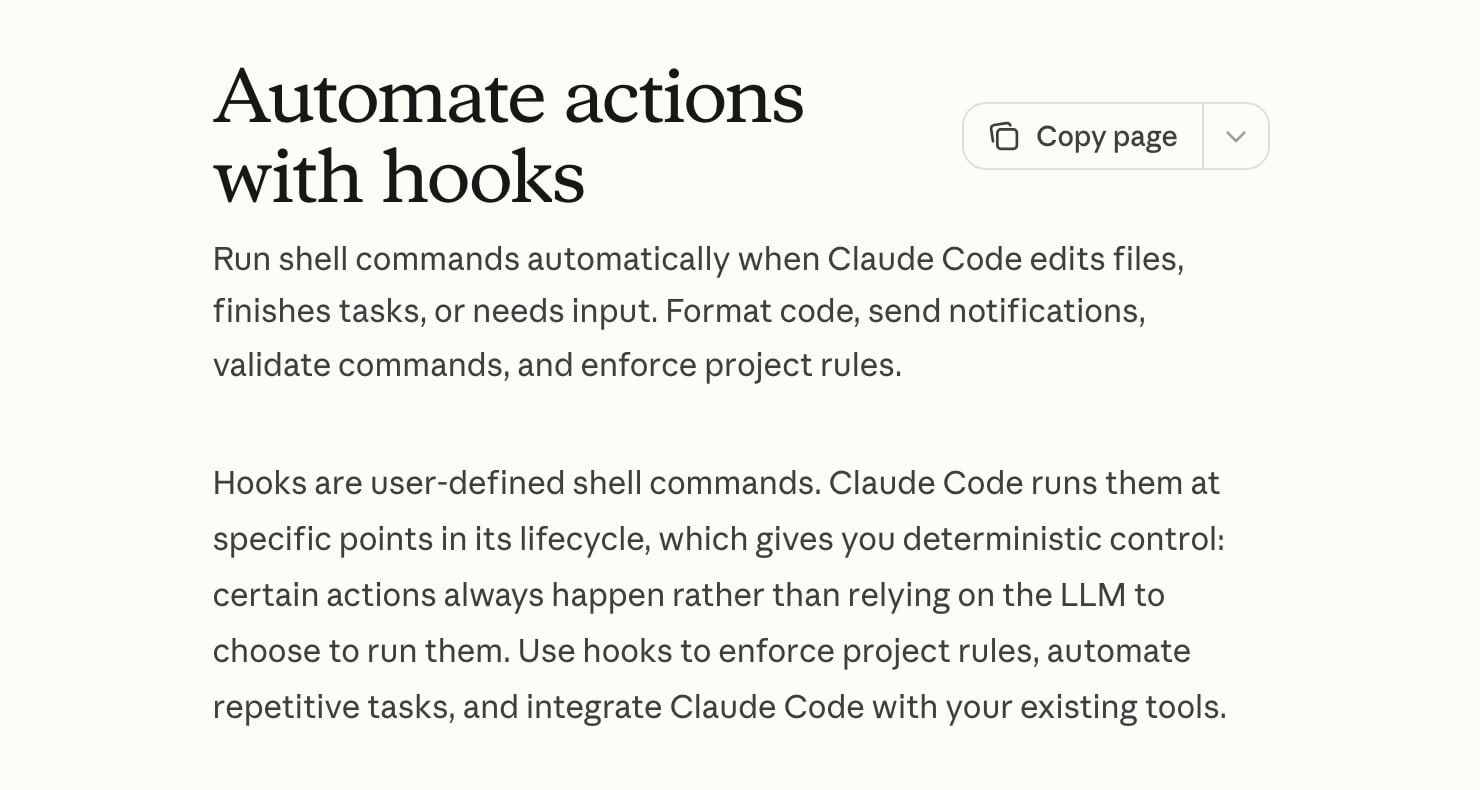
A hook is a rule that runs whether or not Claude remembers it. Anthropic's hooks guide puts it as "deterministic control: certain actions always happen rather than relying on the LLM to choose to run them." You write a command, tell Claude Code which moment to run it at, and from then on it runs every time that moment comes up.
That's the whole difference from an instruction. Put "never do X" in a CLAUDE.md file and Claude will usually follow it. Put the same rule in a hook and it gets followed every time, because the check is a script and Claude never gets a vote.
The moments are called events, and the docs list about 30 as of 28 October. The ones I'd reach for: SessionStart and SessionEnd, UserPromptSubmit (when you press enter), PreToolUse (before Claude runs a tool, like a shell command or a file write), PostToolUse (after), and Stop (when Claude thinks it's done).
How does a hook work, and what can it block?
Claude Code hands the hook a small packet of JSON describing what's about to happen: the tool name, the command, the session. Your script reads it, decides, and answers with its exit code. That's the whole protocol for the simple case.
Per the hooks reference, exit 0 means fine, carry on. Exit 2 is a blocking error on events that can block, and whatever your script printed to stderr becomes the reason Claude sees. Any other exit code is a non-blocking error, so the action goes ahead anyway. That last one catches people out. A policy hook that crashes with exit 1 doesn't stop anything.
Which events can actually stop something is its own list. On PreToolUse, exit 2 blocks the tool call. On UserPromptSubmit it blocks the prompt. On PostToolUse the tool has already run, so exit 2 only shows the error to Claude. On SessionEnd there's nothing to block.
Two more mechanics. A matcher narrows when the hook fires: Bash means only shell commands, Write|Edit means file writes and edits. And a hook doesn't have to be a shell command. The docs list five handler types: command, http, mcp_tool, prompt and agent, where a prompt hook asks a Claude model to make the call and the agent type is marked experimental. I only use command, because for a rule I want it deterministic.
One more from the docs: a hook that exits 0 and says nothing doesn't approve anything. It only gets out of the way.
What do my three hooks actually do?
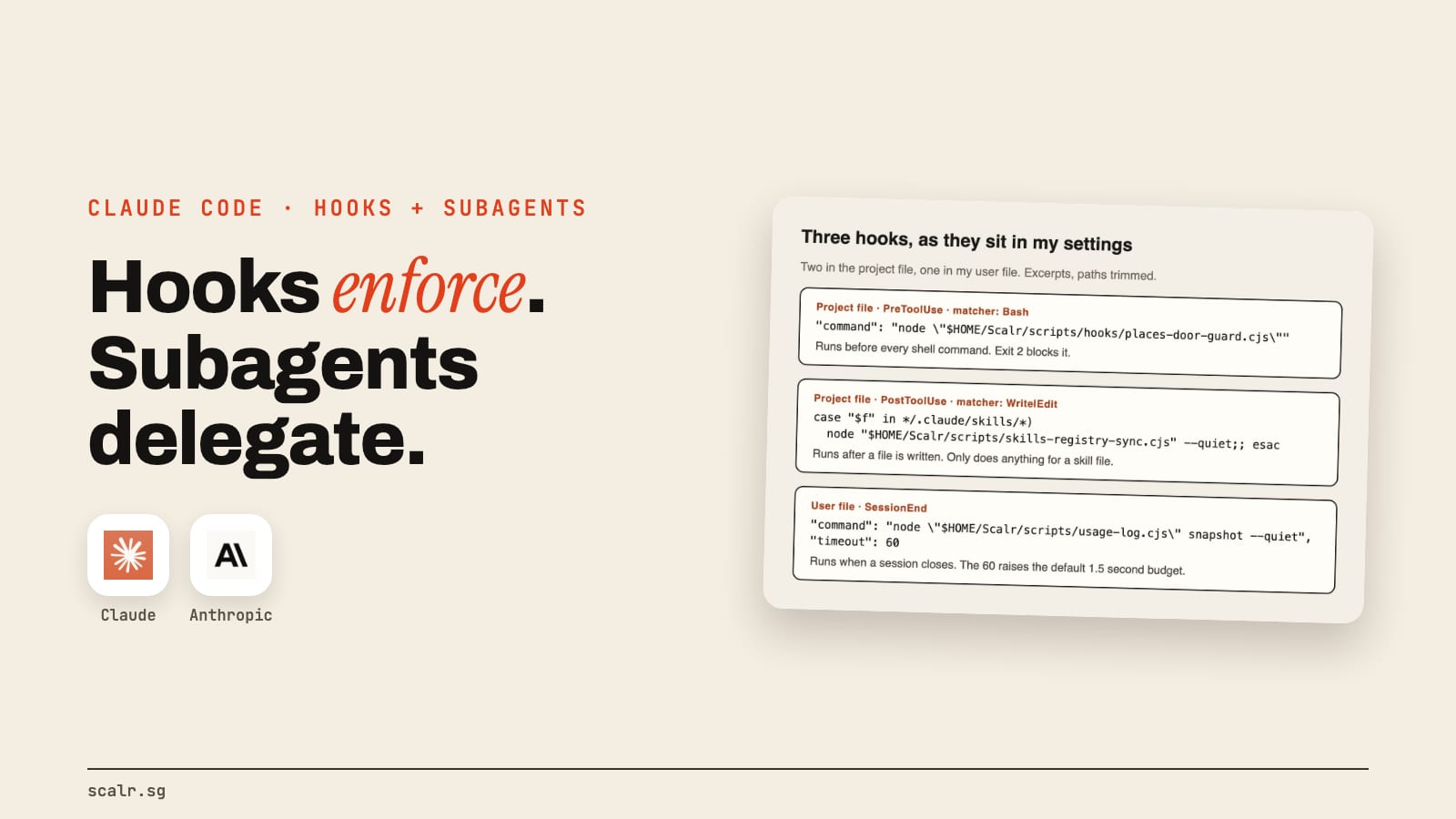
I have two in the project settings file and one in my user file. Here they are, trimmed.
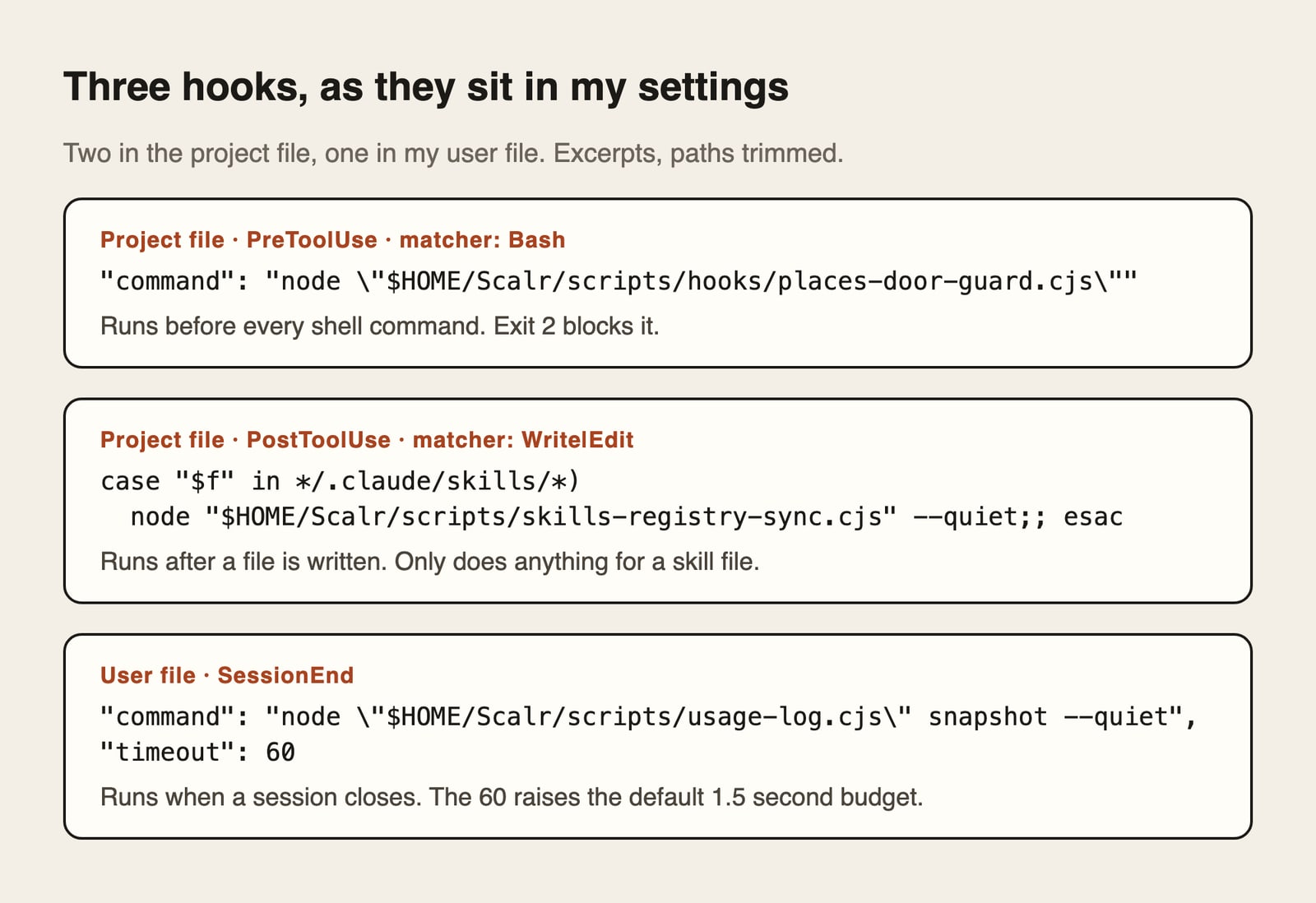
The guard (PreToolUse on Bash). This is the one that matters. Google Cloud bills my card directly, so I have a rule I call the green-light law: no session pulls anything billable from a Google API until I've been told what it'll pull, how many requests and roughly what it costs, and I've said yes in the chat. The hook is a small script that reads every shell command before it runs. If the command looks like a billable Google call and doesn't carry that day's date as my yes, the script exits 2 and prints the reason, so Claude is told exactly why it was refused and what to do instead.
It exists because a written rule wasn't enough. My audit sub-agents had been told in plain words not to call a paid Google API directly, and they called it anyway. The script's own header says it better than I can: "Prose told them not to; this refuses." I've since added a second door the same way, for Apify, a paid web-scraping service.
The registry sync (PostToolUse on Write or Edit). Every time Claude writes or edits a file, this checks whether the file sits inside my skills folder. If it does, it re-runs a script that rewrites my skills index from what's actually on disk, so the list and the count can't drift out of date. If the file is anywhere else, it does nothing. It's the boring one, and the one I'd copy first, because "update the index after this kind of change" is the commonest hook job there is.
The usage snapshot (SessionEnd). Claude Code deletes old session logs on a rolling window, and my usage history was silently going with them. So when a session closes, a script snapshots the numbers into a permanent file that only ever adds to itself. The "timeout": 60 is there for a reason in the docs: SessionEnd hooks share a 1.5-second budget by default, and a longer timeout raises it, up to 60 seconds. A snapshot shouldn't get cut off halfway.
What should you watch for with hooks?
Two things. A guard that matches patterns in the text of a command is a tripwire, not a wall. A command written in a shape the patterns don't anticipate gets through, and the docs themselves say a matcher or if filter is best-effort and the permission system is the right tool for a hard allow or deny.
Second, a hook whose job is to say no should fail closed. The docs say that without "onFailure": "block" (it needs Claude Code 2.1.295 or later), a policy hook that crashes or times out lets everything through. Set it on any guard you're relying on.
What is a Claude Code subagent?
A subagent is a second Claude, started by the first one, that does a job in its own separate context window and returns only the result. Anthropic's subagents page says to use one "when a side task would flood your main conversation with search results, logs, or file contents you won't reference again."
Three things make it more than just a second chat. It has its own system prompt, so you can give it one narrow job and a specific way of working. It has its own tool list, so you can take away its ability to run commands or edit files. And it starts with a fresh context: it doesn't see your conversation, only the brief Claude writes for it plus your CLAUDE.md files.
A subagent is just a markdown file. You drop it in .claude/agents/ for one project or ~/.claude/agents/ for all of them. Only name and description are required. Claude decides when to delegate by reading the description, you can name one in a prompt or @-mention it to force the issue, and tools is an allowlist that inherits everything if you leave it out. There's also a model field, so a cheap job can run on a cheap model. Per the docs, a model set when Claude starts the subagent is checked first, ahead of that field and ahead of whatever the main session runs. Claude Code ships a few built-in ones too, like Explore for read-only codebase search.
Two costs. Subagent work counts toward the same usage limits as your main session, so fan-out isn't free (I wrote up how those limits work separately). And by default a subagent can spawn its own, down to three layers, which is exactly how a small task turns into a big bill.
What do my subagents do?
Two examples, both on disk in my workspace.
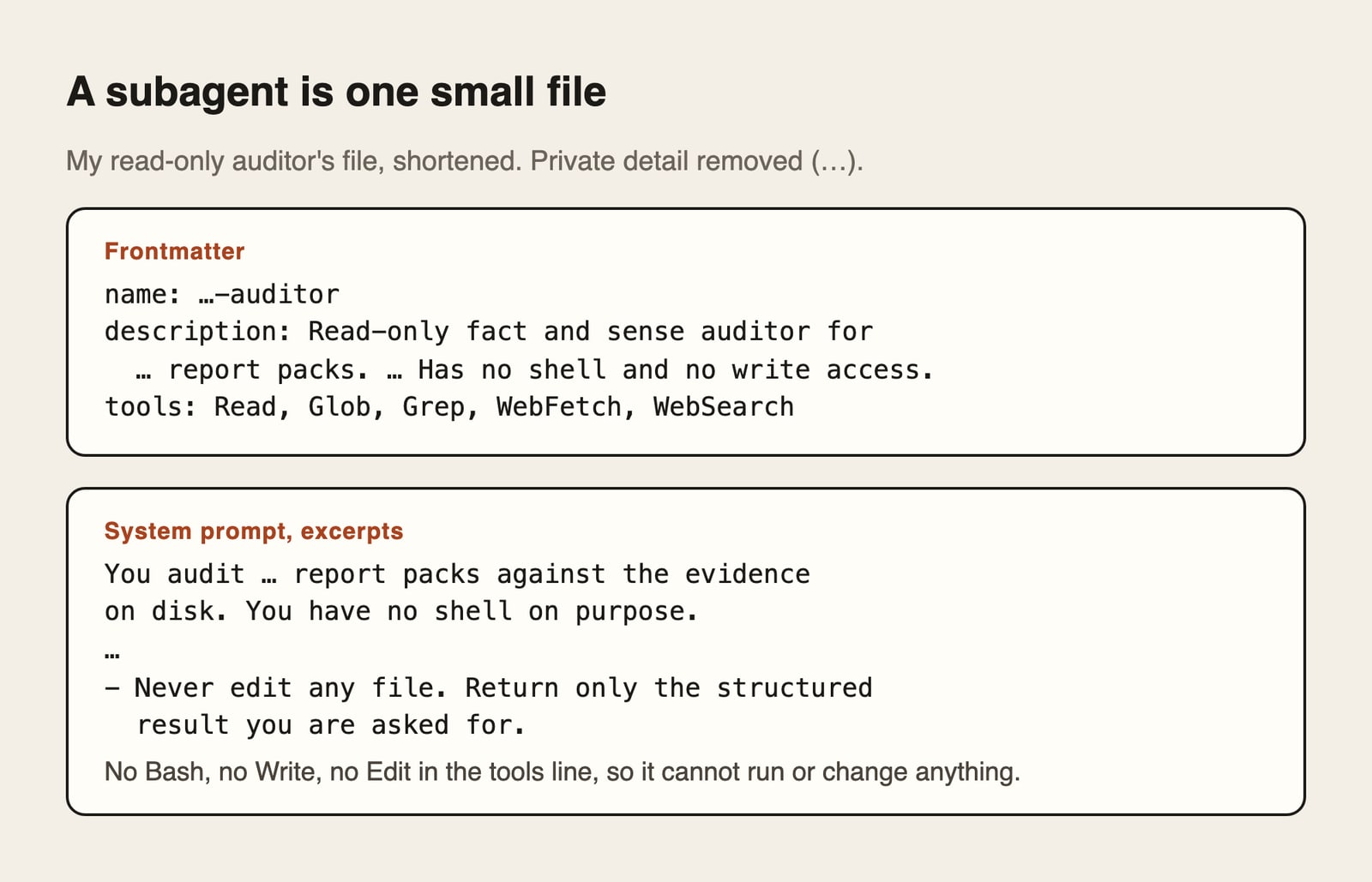
A read-only auditor. One of my subagents fact-checks a finished report against the evidence on file. Its tools line reads Read, Glob, Grep, WebFetch, WebSearch. It can't run a command or change a file. The file says why in its first lines: it has no shell on purpose. It came out of the same lesson as the guard above, so one lesson produced two fixes. The hook refuses a specific kind of command from anyone. The agent definition makes the auditor incapable of running commands in the first place. If it can't reach a claim in the evidence, it has to say "unverifiable" and what a live check would need, and it never edits anything.
Eighteen SEO specialists, installed rather than written. When I installed the free Claude SEO skill, it put 18 subagent files in my agents folder: technical, schema, content, local, sitemap and so on. Sixteen of the 18 pin the cheaper Sonnet model in their frontmatter and carry a turn limit between 15 and 25, so a specialist can't wander. A narrow job and a capped number of turns are the part worth copying. The rest of what runs in my business is in the agents I run.
Hook, subagent, skill or CLAUDE.md rule: which one do I use?
I ask what kind of failure I'm preventing. Here's the table I use.
| Hook | Subagent | Skill | CLAUDE.md rule | |
|---|---|---|---|---|
| What it is | A script that runs at a set moment | A separate Claude with its own context and tools | A saved procedure Claude loads when the task matches | A standing instruction Claude reads every session |
| Who decides it runs | Claude Code itself, every time | Claude, from the description (or you, by name) | Claude, from the description | Claude, by choosing to follow it |
| Can it block an action? | Yes (exit 2 on a blocking event) | Only by what you remove from its tools | No | No, it can only ask |
| Best for | Rules that must never be broken, automatic follow-up jobs | Noisy side jobs, read-only checks, a different model | A repeatable how-to with steps and files | Context, preferences, "how we do things here" |
| My example | The Google spend guard | The read-only auditor | The reel editor | The green-light law, written out for Claude to understand |
| Failure mode | Fails open if it crashes | Costs tokens, starts with no memory | Doesn't trigger if the description is vague | Ignored under pressure |
Notice the last row of my own example column. The green-light law lives in both my CLAUDE.md and my hook, and it needs both. The CLAUDE.md line tells Claude why, so it doesn't keep trying workarounds. The hook is what stops it when it tries anyway. If you want the skill side of this table, I covered it in the Claude Skills guide, and the CLAUDE.md side in a real CLAUDE.md example.
When should you not use a hook?
When the rule needs judgment. A script can match a pattern, but it can't decide whether a paragraph is good. The docs do offer prompt and agent hooks that ask a model to judge, but then it's not deterministic any more, which was the point of a hook.
Also skip a hook when a plain permission setting already does the job, since the docs say to use the permission system for a hard allow or deny. And skip it while you're unsure what you want. A hook that blocks the wrong thing fires every single time.
When should you not use a subagent?
When the work needs back-and-forth. A subagent starts with none of your conversation, so anything that depends on what you said ten minutes ago has to be written into its brief, and that's easy to get wrong. The docs say the same: keep frequent back-and-forth, quick targeted edits and anything latency-sensitive in the main conversation.
Also not for a tiny job, because a subagent has setup cost. My own notes say multi-agent fan-out is the fastest way to burn through the weekly limit, so I don't run a fleet without a reason.
What about "agent teams"? That's a separate experimental feature, switched off by default, where several full Claude Code sessions work in parallel and message each other. Anthropic's agent teams page says they use significantly more tokens than a single session and to prefer subagents for sequential or same-file work.
If you'd like the official walkthrough, Claude Academy has a free Introduction to subagents course, four lessons and about 45 minutes as of 28 October, and I wrote up the order of the other Academy courses.
Key takeaways
- A hook is a script Claude Code runs at a set event. Exit 2 on a blocking event stops the action, and it works whether or not Claude remembers your rule.
- A subagent is a separate Claude with its own context, tools and prompt, defined in one markdown file. It returns a summary, and its work counts against your usage limits.
- When an instruction in CLAUDE.md isn't enough, a hook makes it a rule. When a job is noisy or should be read-only, a subagent makes it a worker.
- Both have limits worth knowing: a pattern-matching guard is a tripwire, not a wall, and a subagent starts with no memory.
FAQ
What are Claude Code hooks used for?
Claude Code hooks are used to make something always happen or never happen around Claude's actions. Common jobs are blocking dangerous commands before they run, formatting or indexing after a file edit, sending a notification when Claude needs input, and saving a record when a session ends. Mine block unapproved billable Google calls, refresh a skills index, and snapshot my usage history.
Where do you put Claude Code hooks?
You put them in a settings file. The user file at ~/.claude/settings.json applies to every project, .claude/settings.json in a project applies there and can be committed, and .claude/settings.local.json is the same but not committed. Hooks can also live in a plugin or in a skill or subagent's own frontmatter. Each hook names an event, an optional matcher and a command.
How do I create a Claude Code subagent?
Create a markdown file in .claude/agents/ for one project, or ~/.claude/agents/ for all projects. It needs frontmatter with a name and a description, and the body becomes the subagent's system prompt. Add a tools line to restrict what it can do and a model line to choose the model. Claude then delegates to it when a task matches the description, or you can name it.
What is the difference between a Claude Code subagent and a skill?
A subagent is a separate worker with its own context window, tools and model. A skill is a saved procedure that Claude loads into its current conversation when a task matches. Use a subagent when the job is noisy or needs different permissions, and a skill when you want a repeatable how-to that stays in the same conversation.
Can a Claude Code hook stop Claude from doing something?
Yes, on events that can block. A PreToolUse hook that exits with code 2 stops the tool call and shows its stderr message to Claude as the reason. A hook that exits with another failure code does not block, and a hook that crashes can let the action through unless onFailure is set to block. A hook cannot undo something a tool already did.