Singapore
AntiScam Pango vs ScamShield: GovTech's New AI Scam Checker, Explained
ScamShield blocks scam calls, filters scam SMS and checks anything you paste into it. AntiScam Pango, GovTech's new Android beta, reads your WhatsApp, Telegram and SMS notifications on the phone and warns you when a conversation looks like a scam. What each one does, who can get Pango today, and when ScamShield is still the right app.
ScamShield is the government's anti-scam suite: an app for iPhone and Android that blocks scam calls, filters scam SMS and checks any number, message or link you give it, plus the 24/7 helpline at 1799. AntiScam Pango is GovTech's new Android beta, launched on 4 November 2026. It reads incoming WhatsApp, Telegram and SMS notifications on your phone and warns you when a conversation looks like a scam, though it can't block anything.
Every fact below comes from GovTech's launch release, its factsheet, Pango's own site at pango.gov.sg and ScamShield's site.
The short verdict. Keep ScamShield, because it's the one that blocks calls, filters SMS, runs on iPhone and comes with a helpline. Add AntiScam Pango if you have an Android phone running Android 12 or newer with 6GB of RAM, and most of your chats are in English on WhatsApp or Telegram. GovTech's own advice is to use both, and Pango's download page says that "for most people, ScamShield is the right choice."
| ScamShield | AntiScam Pango | |
|---|---|---|
| What it does | Blocks scam calls, filters scam SMS, checks what you submit | Watches incoming messages and warns you |
| When it acts | Calls and SMS automatically; checks when you ask | On every new message notification |
| Apps covered | Calls, SMS; checks of SMS, WhatsApp and Telegram screenshots | WhatsApp, Telegram, SMS |
| Phones | iPhone and Android | Android 12+, 6GB RAM, beta |
| Can it block? | Yes, calls and SMS | No, it only warns |
| Languages | Not stated on its pages | English only, for now |
| Helpline | 24/7 ScamShield Helpline, 1799 | Points you to 1799 |
What is AntiScam Pango?
AntiScam Pango is an Android app from GovTech Singapore that uses an AI model running on your phone to spot scam-like conversations as the messages arrive. Jasmin Lau, Minister-in-charge of GovTech, announced the beta at the STACK Conference 2026, and it's on the Google Play Store now.
Once you grant it permission, Pango "runs in the background and analyses incoming message notifications from supported messaging applications, including WhatsApp, Telegram and SMS," in GovTech's words. Messages from the same sender are chained into one conversation, so it can catch a scam that builds over several messages rather than judging each line alone. The model was trained on scam patterns relevant to Singapore and built with Google DeepMind, the lab behind Gemini 4 Carbon.
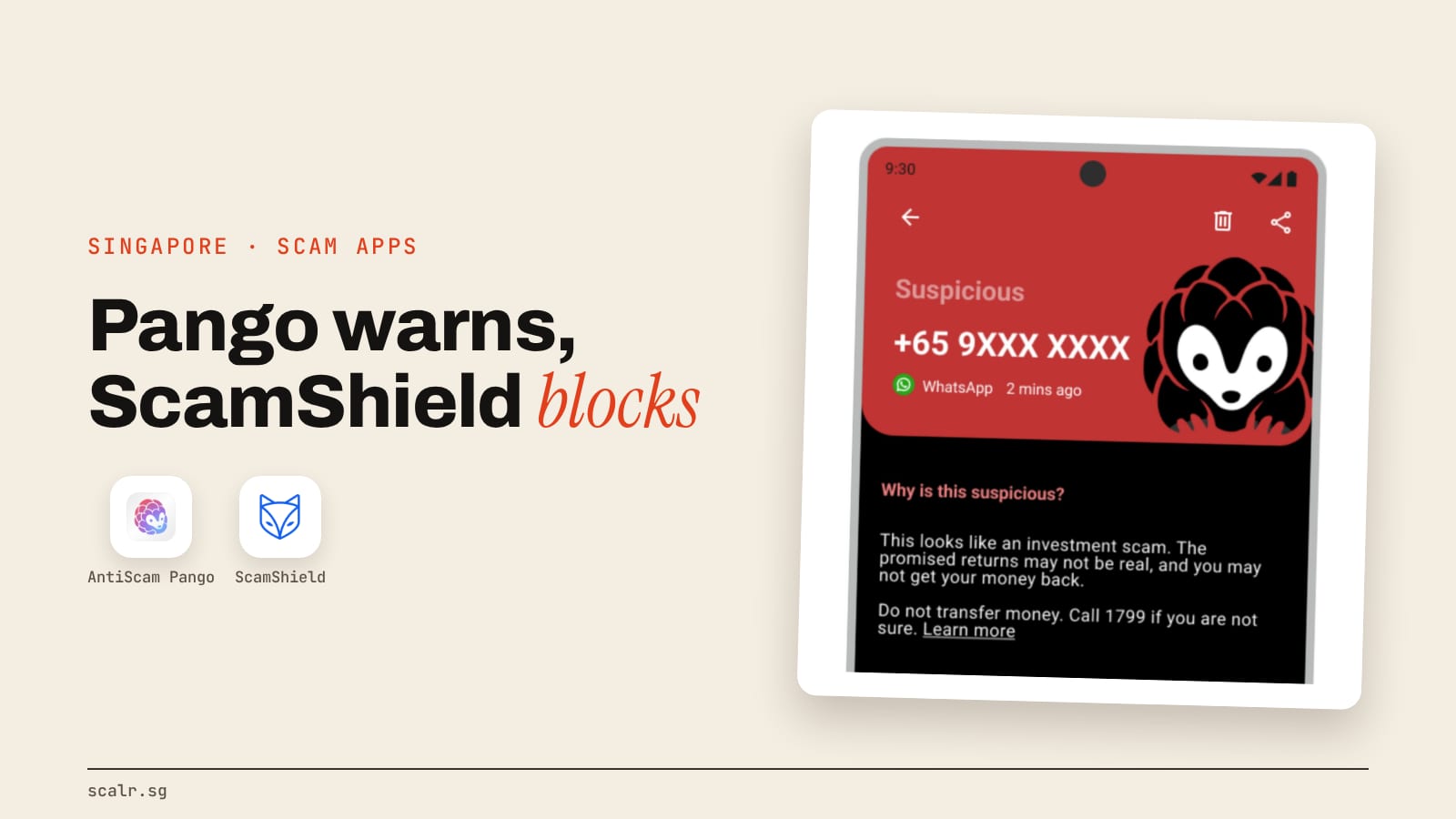
When a conversation looks wrong, you get a Scam Alert. Pango's own guide is careful about what that means: "It doesn't mean you've been scammed. It means: stop and check before you act."
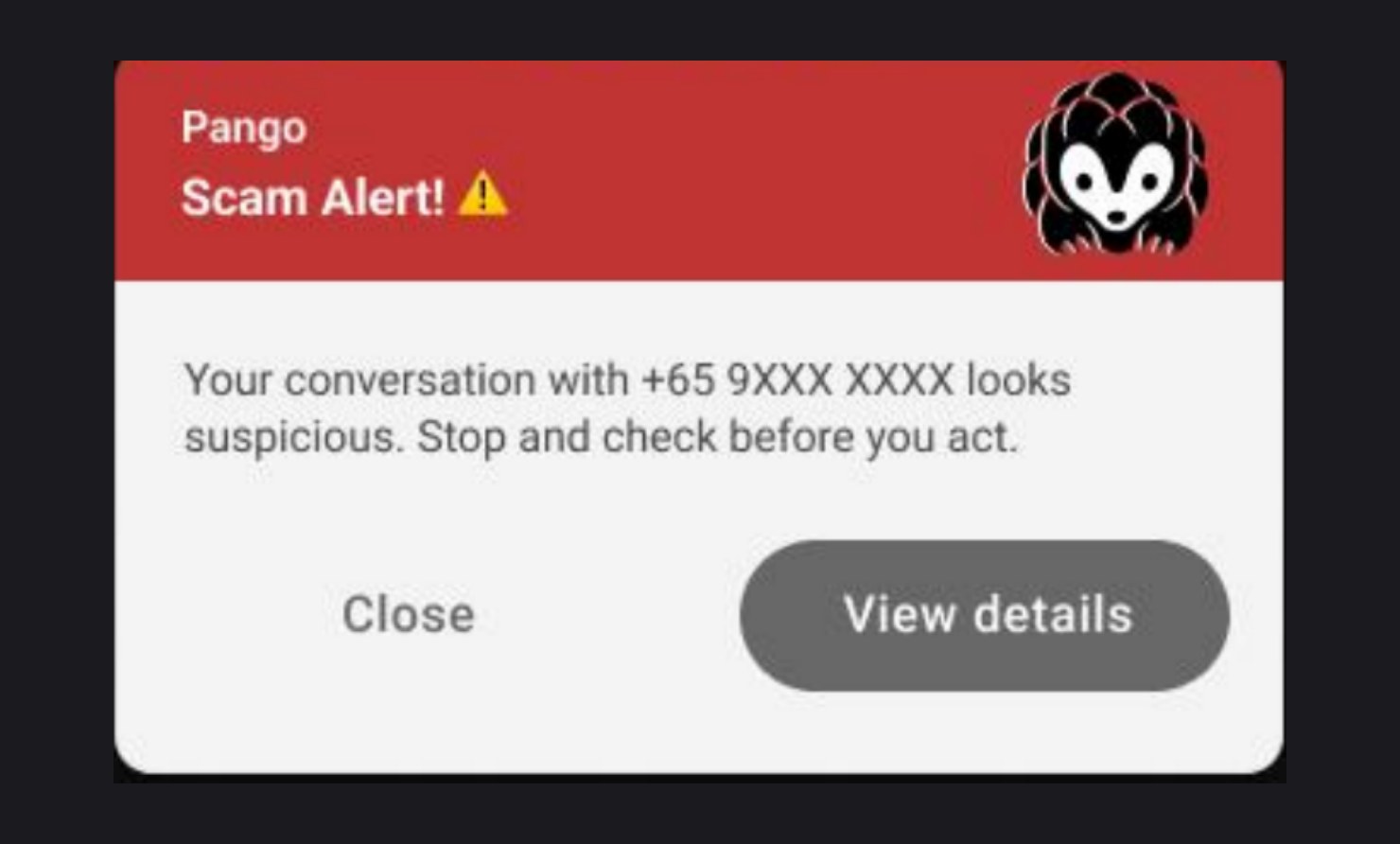
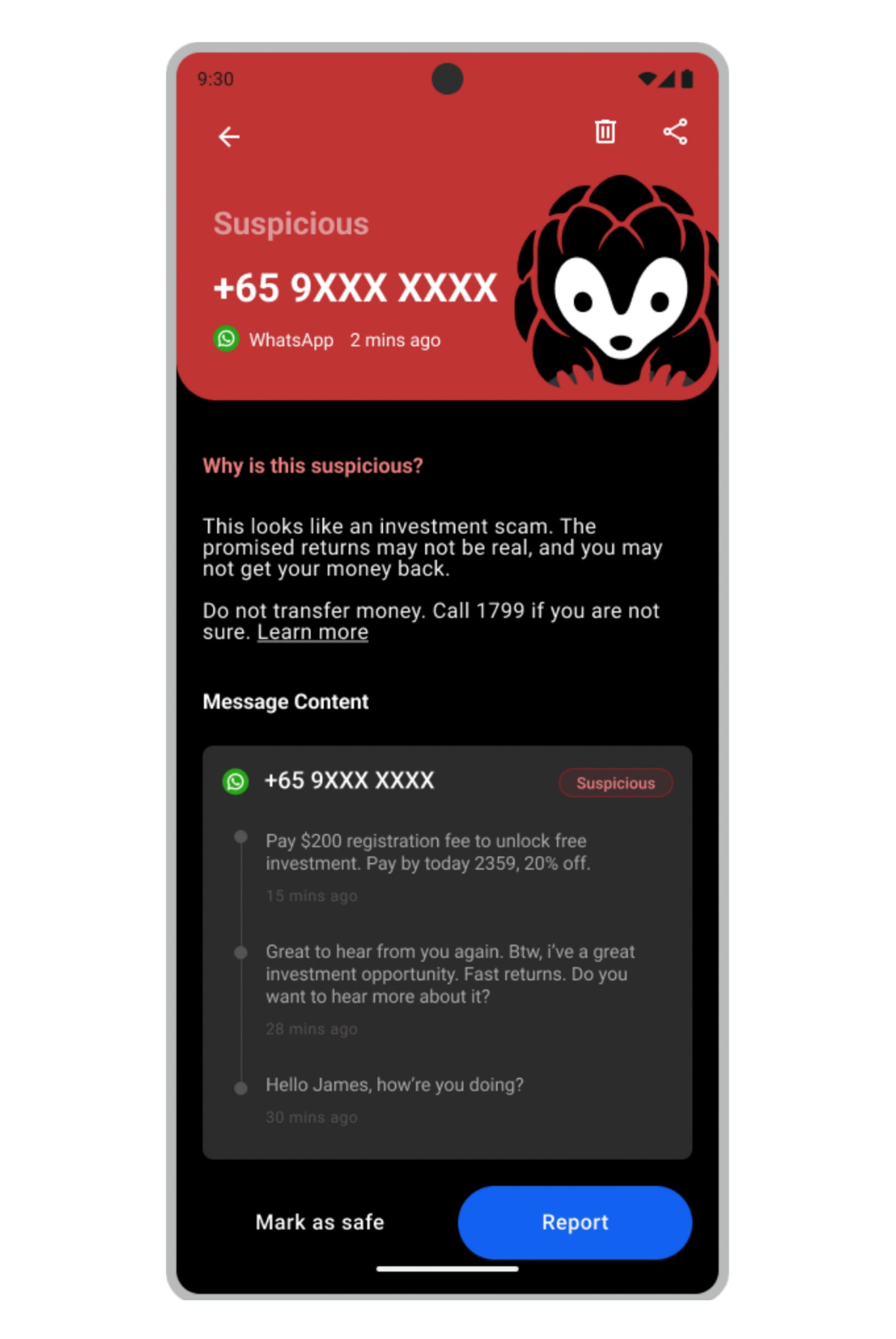
Tap View details and Pango marks the conversation Suspicious, names the kind of scam it looks like and tells you what to do. From there you can report it, or tap Mark as safe if you know it's harmless.
What can't AntiScam Pango do?
AntiScam Pango can't block or delete anything. GovTech says it plainly: "The app cannot automatically block or delete messages, and users are in control of how they respond." Reporting doesn't block the sender either. Pango's FAQ tells you to block them inside WhatsApp, Telegram or Messages yourself, and explains that reports go to the authorities, who pass confirmed scam numbers to the platforms, which takes time.
It also misses some messages by design, and Pango's FAQ lists where:
- Muted chats, and chats you're already reading. Pango works from notifications, so a message that never makes one may not get scanned.
- Every other app. Messenger, Instagram, WeChat, LINE and Signal aren't checked at all.
- Other languages. The model was trained on English scam messages, so a scam written in Chinese, Malay or Tamil may not be flagged.
- Safe senders. Messages from anyone you add to that list aren't checked, so a hijacked account on it won't trigger a warning.
- A paused app. Some phones stop background apps to save battery, and Pango can't check new messages while it's paused.
The FAQ is just as frank about accuracy: "the AI will sometimes get it wrong in both directions. Treat an alert as a prompt to slow down, not a guarantee, and treat the absence of an alert the same way."
Who can get AntiScam Pango today?
Anyone with a supported Android phone can download it from Google Play now. Pango's FAQ sets the bar at Android 12 or newer with 6GB of RAM, and Google Play won't let you install it on a phone below that. The app is about 300MB because the AI model lives inside it, so Pango suggests downloading on Wi-Fi.
Check that the listing is published by Government Technology Agency before you install, even when someone you know sent the link.
There's no iPhone version. The factsheet explains why: Android lets an app ask to read other apps' notifications as they arrive, and iOS has no equivalent. GovTech says it's exploring ways to bring the same on-device approach to iOS, with no date given.
Setup takes two required permissions, notification access so Pango can read new messages and notifications so it can warn you, plus an optional third for picking safe senders. Pango also recommends turning on its over-other-apps warning, so an alert pops up on screen rather than sitting in your notification shade.
Does AntiScam Pango read my messages?
Yes, on your phone, and only there. All analysis happens on the device, and the factsheet says "neither GovTech Singapore nor any of its partners can access the users' personal information or private messages through this app."
Pango's privacy FAQ lists the only three things that ever leave the phone: a scam report you choose to send (which you can review first, with any NRIC number hidden), aggregated counts if you switch them on (off by default), and standard crash and usage analytics with no message content. It can't open your chat apps or read history from before you installed it. Scanned messages stay on the phone for 7, 14 or 28 days, your choice, then delete themselves.
A small model running on the phone is what lets a government app check every WhatsApp message without anyone at GovTech seeing them. Mark Chen, GovTech's Director of Trust and Safety, put it this way: people "do not have to choose between protection from scams and keeping their personal messages private."
How is AntiScam Pango different from ScamShield?
The difference is who starts the check. ScamShield checks what you bring to it, and Pango watches what arrives without being asked.
On ScamShield's own page, it's a suite: the app for iPhone and Android, the 24/7 helpline at 1799, the website and a WhatsApp alert channel. The app blocks and filters scam calls and SMS automatically. For everything else you submit the number, message or link yourself, and for WhatsApp or Telegram that means uploading a screenshot. ScamShield's AI checker then tells you whether it comes from a verified source such as a registered business or a government agency, whether it resembles known scams, and whether other people have reported it. If it looks like a scam, it reports the details to the authorities automatically.
Pango flips that around. It reads each new WhatsApp, Telegram or SMS message as it lands and judges the wording of the whole conversation, which is how GovTech says it can catch suspicious conversations "including those from numbers that may not have been previously flagged." That covers a brand-new number whose very first message is already a scam.
There's also a difference in how much of your phone each app touches. ScamShield's app can't read SMS from your saved contacts and only scans SMS from unfamiliar numbers. Pango checks saved contacts too, because, as its FAQ puts it, "a scam from a familiar name is one of the most convincing kinds." Pango's FAQ also says it "needs deeper access to your phone."
Where do ScamShield and AntiScam Pango overlap?
Both come from the government, and both point you to the same place when you're unsure: the ScamShield Helpline at 1799. Pango's alert screen even prints that number.
Both use AI to judge messages, and both send reports to the authorities, so a report from either one adds to the same picture of which numbers scammers are using. GovTech says it will explore building Pango's features into the ScamShield app as Pango matures, so the overlap is likely to grow.
The scale is why both exist. ScamShield's site reports 16,281 scam cases in the first half of 2026, with about S$410.6 million lost, and Pango's site says more than 4,000 of those cases reached victims through WhatsApp or Telegram.
When is ScamShield still the right one?
ScamShield is the right app whenever Pango can't help, which today covers a lot of people. Pick ScamShield alone if:
- you use an iPhone
- your Android phone is older than Android 12 or has less than 6GB of RAM
- the threat is scam calls, which Pango doesn't touch
- you want something blocked, rather than flagged
- you want to check a link, a number or a website before acting on it
- most of your messages, or your parents' messages, aren't in English, since Pango may not flag those
Add Pango on top when you have a supported Android phone and most of your chats happen in English on WhatsApp or Telegram. That's the case GovTech built it for, and it covers the gap ScamShield leaves: a first message from a new number, inside a chat app, that nobody has reported yet.
If you've already transferred money or shared your details, neither app undoes that. Pango's guide sends you to ScamShield's "I've been scammed" steps.
Key takeaways
- ScamShield blocks scam calls, filters scam SMS and checks anything you submit. It runs on iPhone and Android and includes the 1799 helpline.
- AntiScam Pango, launched in beta on 4 November 2026, reads incoming WhatsApp, Telegram and SMS notifications and warns you about scam-like conversations. It can't block or delete.
- Pango needs Android 12 or newer with 6GB of RAM, understands English only, and has no iPhone version yet.
- Pango's AI runs on the phone, and messages leave it only when you send a report.
- GovTech's advice is to run both. For most people, ScamShield comes first.
FAQ
Is AntiScam Pango the same as ScamShield?
No. Both are government anti-scam apps, but ScamShield blocks scam calls, filters scam SMS and checks numbers, messages and links you submit, while AntiScam Pango watches incoming WhatsApp, Telegram and SMS messages on Android and warns you about suspicious conversations. GovTech recommends using both.
Is AntiScam Pango available on iPhone?
No. AntiScam Pango is Android only, because Android lets an app read other apps' notifications as they arrive and iOS doesn't. GovTech says it's exploring ways to bring it to iPhone, with no date given. iPhone users can use the ScamShield app, which runs on iOS.
Can AntiScam Pango block scam messages?
No. AntiScam Pango only warns you and explains why a conversation looks suspicious. It can't block or delete messages, and a report doesn't block the sender either, so you block them inside WhatsApp, Telegram or your SMS app yourself.
Does AntiScam Pango send my WhatsApp messages to the government?
No. AntiScam Pango analyses messages on your phone, and GovTech's factsheet says neither GovTech nor its partners can access your private messages through the app. A message leaves your phone only when you choose to submit it as a scam report.
Which phones can run AntiScam Pango?
AntiScam Pango runs on Android phones with Android 12 or newer and 6GB of RAM or more. Google Play won't install it on an older or smaller phone. The download is about 300MB because the AI model is inside the app.
What should I do if AntiScam Pango flags a message?
Don't click its links, call numbers in it or reply. Contact the sender another way, using an official website or hotline for a bank or agency, or a number you already have for someone you know. If you're unsure, call the 24/7 ScamShield Helpline at 1799.