colibri
Colibri Runs a 744 Billion Parameter AI on a Laptop
Colibri AI is a free, open-source engine that runs very large AI models on an ordinary computer by reading most of the model off the disk. Here's the repo, which model to start with on a normal laptop, the disk check, and how slow the big one really is.
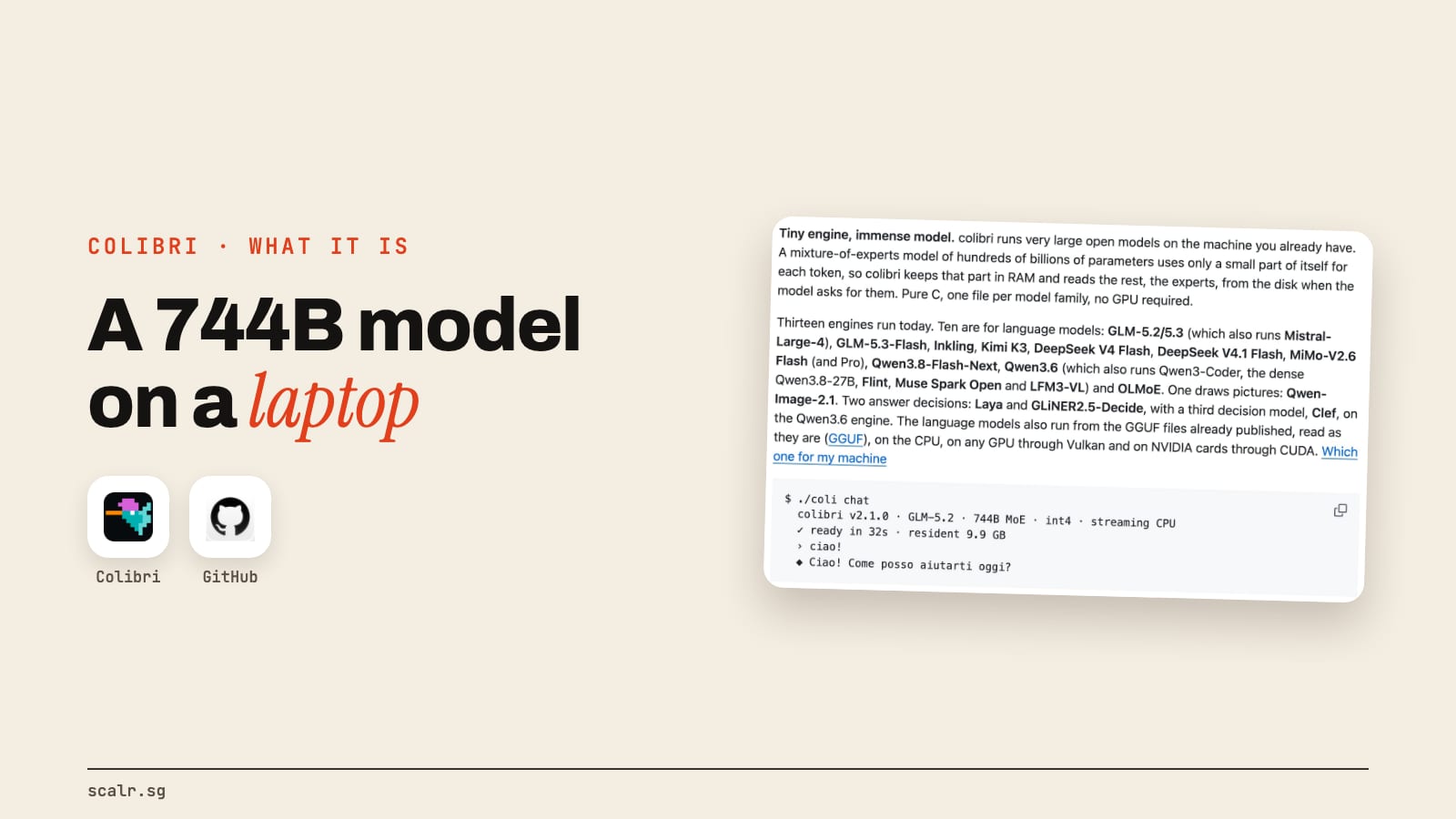
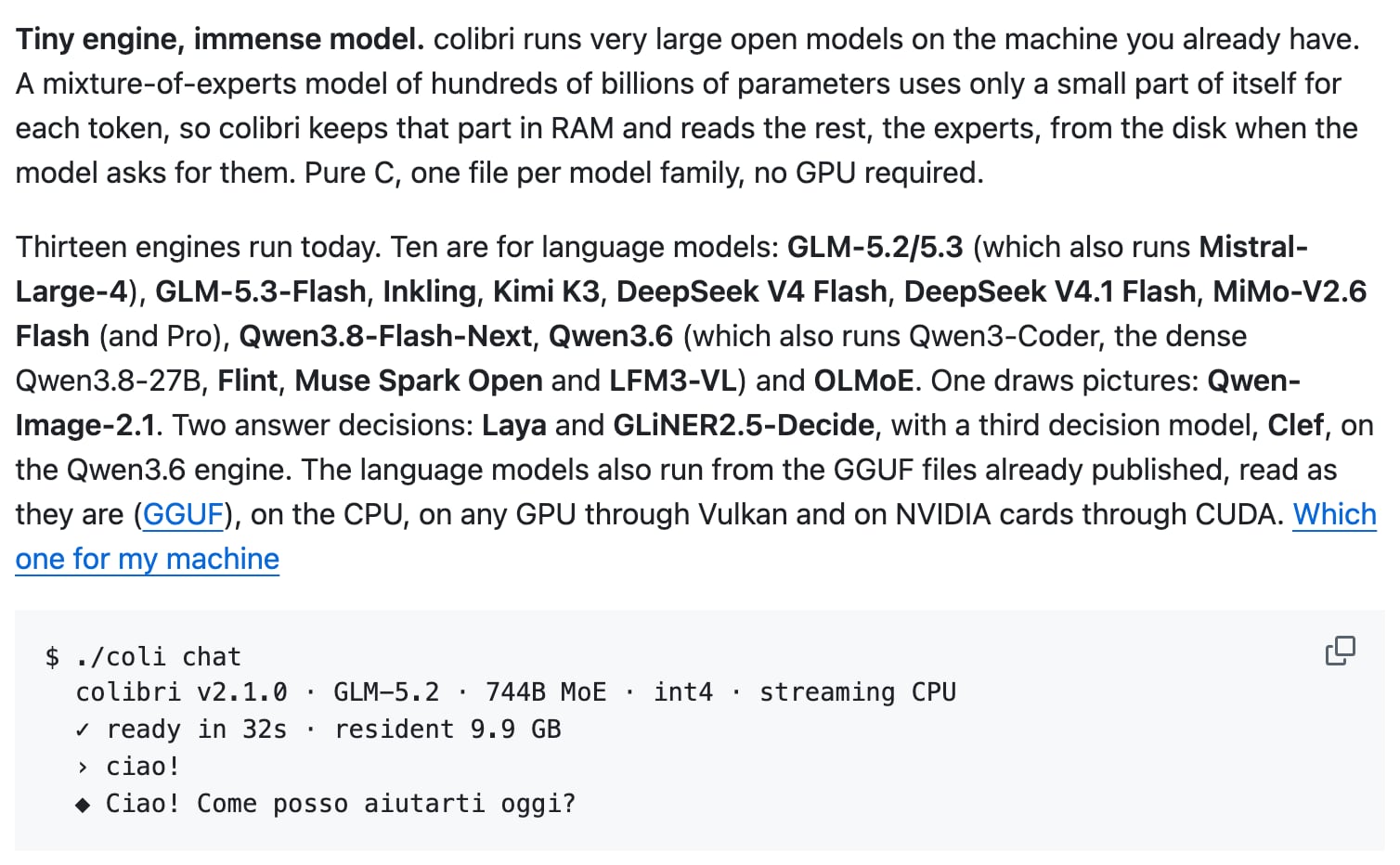
Colibri is a free, open-source engine that runs very large open AI models on a computer you already own, with no graphics card. It keeps the small part of the model each word needs in memory and reads the rest straight off the disk, and once a model is downloaded it works offline.
Vincenzo Fornaro built it, the engine is Apache 2.0, and it had 47,464 stars on GitHub on 4 November 2026. The number everyone quotes is GLM-5.2, a model with 744 billion parameters, running on a laptop. That's the model you shouldn't download first, for reasons the next two sections will make plain.
Which colibri model should you start with on a normal laptop?
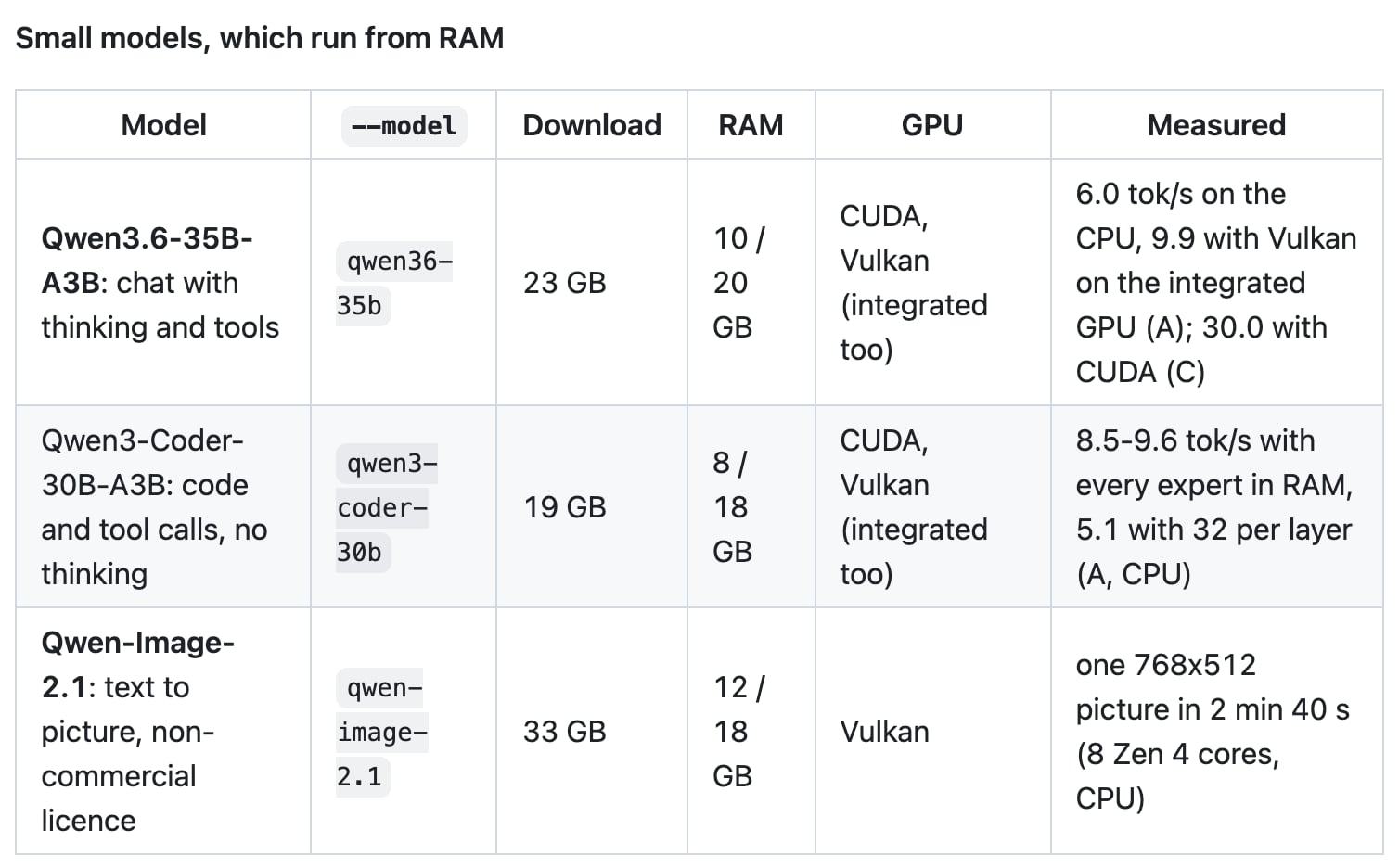
Start with a small one, which is also what colibri's setup will pick for you. It recommends the most capable model that runs from your RAM, and a comment in its own catalog gives the reason: "A 20 GB download that answers at several tokens per second is the better first experience than a 400 GB one at a fraction of a token." A token is roughly a short word, or a piece of a longer one.
| Your laptop | What the setup picks | Download | It wants | Measured speed |
|---|---|---|---|---|
| 8 GB of RAM | Qwen3-Coder-30B-A3B, a coding model | 19 GB | 22 GB of disk, 8 to 18 GB of RAM | 5.1 to 9.6 tokens a second on an 8-core desktop's CPU |
| 16 GB of RAM | Qwen3.6-35B-A3B, for general chat | 23 GB | 26 GB of disk, 10 to 20 GB of RAM | 2.1 on an i7-1355U laptop, 6.0 on that desktop |
| The famous one | GLM-5.2, 744 billion parameters | 429 GB | 440 GB of disk, 16 to 24 GB of RAM | 0.05 to 0.1, cold, on a 25 GB laptop |
Sizes, RAM and speeds come from the README on 4 November 2026. The disk figure is the catalog's own rule, the download plus 2% plus 2 GB. Below the lower RAM number a model won't start, and from the higher one it runs at the speeds measured.
If you want to choose instead of taking the recommendation, the ids are qwen3-coder-30b, qwen36-35b and glm-5.2, and you pass them with --model.
How do you check your disk before you download?
Check it first, because even the smallest chat model wants more than 20 GB free. On a Mac or Linux, this shows the free space in your home folder, under the column called Avail:
df -h ~On Windows, open File Explorer and look at This PC. Colibri puts models in ~/colibri-models by default, and --dir points it at a bigger drive if yours is short.
Once you've got the repo, the setup does a better check, which compares every model against your machine and says why any of them doesn't fit:
./start-here.sh --listOn Windows that's START-HERE.bat --list. Take a 16 GB laptop with 100 GB free. By the catalog's rules, Qwen3.6-35B-A3B fits and runs with a small expert cache, while GLM-5.2 fails on the disk, because it wants about 440 GB free. For the large models the disk also sets the speed, and the README says a fast NVMe drive helps most.
How do you install colibri?
The README's one-step setup asks you one question, which model, and Enter takes the recommendation. It looks at your RAM, disk, CPU and GPUs, gets the engine, downloads the model with resume, then opens a dashboard in your browser at http://127.0.0.1:8000/.
On a Mac with Homebrew:
xcode-select --install
brew install libomp git python
git clone https://github.com/JustVugg/colibri
cd colibri
./start-here.sh
On Windows, click Code and then Download ZIP on the GitHub page, unzip it, and double-click START-HERE.bat. It offers to install Python if that's missing. On Linux, the README lists the same steps with apt.
If you use Claude Code, you can hand this to it. The README gives one line for that, and the guide it points to tells the assistant to ask you before it downloads a model or installs a system package:
Set up colibri on this machine following docs/AI_SETUP.md from https://github.com/JustVugg/colibri
How does colibri run a model that doesn't fit in memory?
It keeps only what each token needs in memory and reads the rest off the disk as it goes, kind of like Netflix streaming a movie, except you've already downloaded the whole film to your own drive. GLM-5.2 is a mixture-of-experts model, which means it's split into many specialist parts and only a few run for any one token. Per the README it has 744 billion parameters, uses about 40 billion for each token, and only about 11 GB of those change from one token to the next.
So the shared part stays in RAM, and the experts stay on disk until the model asks for them. A cache learns which experts your work uses, and the README says colibri gets faster the more you use it.
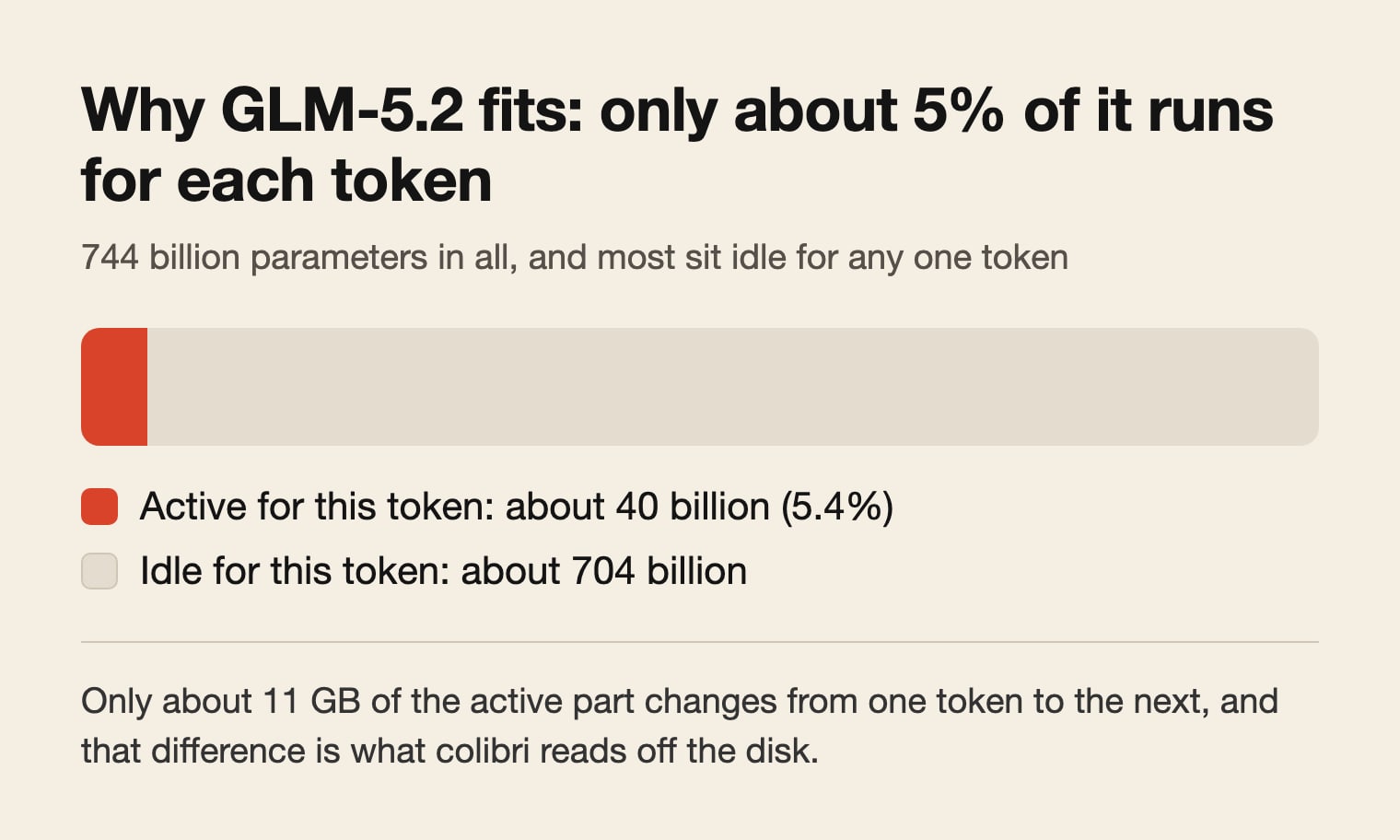
Keeping most of it on disk doesn't change the answer. The README's design goal is that where a weight sits only affects how fast the answer comes, not which weights produce it. The download itself is a compressed int4 copy of the model, which is part of how 744 billion parameters fit in 429 GB.
How slow is the 744 billion parameter model on a laptop?
Very slow. The README measures GLM-5.2 at 0.05 to 0.1 tokens a second, cold, on a 25 GB laptop, which is 10 to 20 seconds for every token. A 20-token sentence takes roughly three to seven minutes at that speed. Cold means nothing's cached yet.
The speed comes from the hardware, and the same row of the README shows how much it moves:
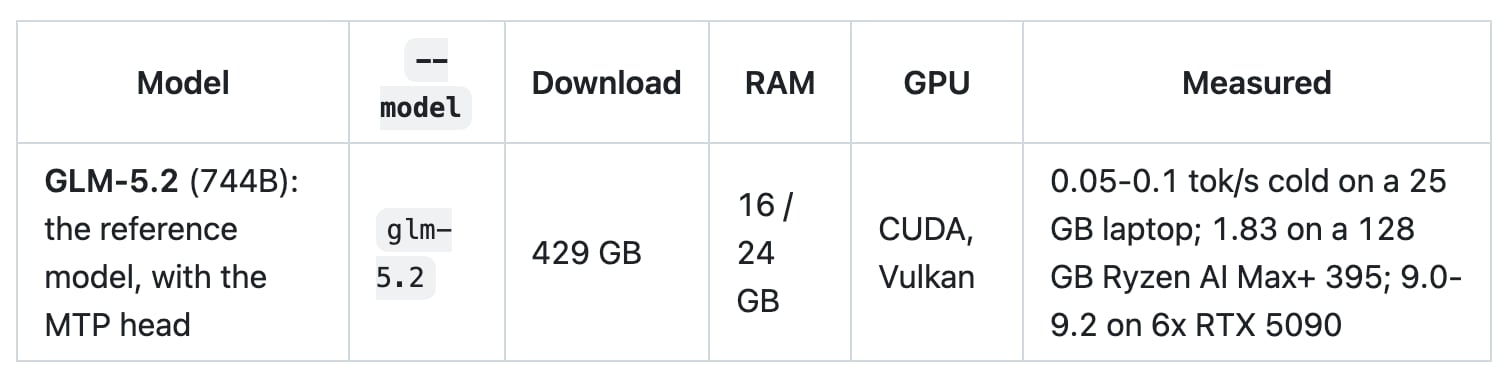
For scale, the small model on the 16 GB line does 2.1 tokens a second on a laptop, so a reply of about 130 tokens, roughly 100 words, comes back in about a minute. That's slow next to a hosted chatbot, and it's usable.
Does colibri really work offline?
Yes, once the model is downloaded. Colibri's Docker guide answers the question directly: after the download you need zero internet, because it "works completely offline". The server it starts listens on 127.0.0.1, which is your own machine.
There's one switch to know about. The newer chat UI, coli ui, has an optional web search, and its README says that with it on, your query goes to the search engine and the model reads the pages it chooses. Leave it off and nothing needs to go out. That's the real difference from an agent app that runs locally but calls a hosted model, like DeepSeek's free version of Claude Code, where your prompts still go to the provider.
How does colibri compare with Claude?
They do different jobs, and this site is mostly about Claude, so here's the plain version.
| Colibri | Claude | |
|---|---|---|
| Where the model runs | Your own computer | Anthropic's servers |
| Which models | Open models such as GLM-5.2, Qwen3.6 and DeepSeek V4 Flash | Anthropic's own, which don't download |
| Cost on 4 November 2026 | Free engine, plus your disk and electricity | Pro at US$17 a month billed yearly, or US$20 monthly, and the limits are a topic of their own |
| After setup, needs internet? | No | Yes |
| How fast it feels | Depends on your RAM and disk | Doesn't depend on your laptop |
The README also says the server is Anthropic-compatible, "so Claude Code and the Anthropic SDKs work against it", which means you can point Claude Code at a local model. On a laptop, expect that to feel like the speeds in the tables above.
Colibri or Ollama for running an LLM locally?
If small models are all you plan to run, Ollama covers that job on macOS, Linux and Windows, and it also offers a hosted cloud. Colibri's reason to exist is the large models, the ones with hundreds of billions of parameters that don't fit in your RAM. It also reads the GGUF model files that are already published, so the small end of what it runs overlaps with what you may already have.
When is colibri the wrong tool?
It's the wrong tool if you need quick answers from a very large model on a laptop, because the disk and RAM won't get you there. It won't fit if your machine has under 8 GB of RAM or less than 22 GB free, which the README sets as the floor. And for a daily assistant on client work, a hosted model won't keep you waiting on your laptop's disk.
Check the licence of the model as well as the engine. Colibri itself is Apache 2.0, but each model keeps the licence its authors gave it. GLM-5.2's weights are MIT, and Qwen-Image-2.1 is for non-commercial use only.
Key takeaways
- Colibri is a free, Apache 2.0 engine that runs very large open models on your own computer, with no GPU required, by reading most of the model off the disk.
- On a normal laptop, start with a small model: Qwen3.6-35B-A3B on 16 GB of RAM, or Qwen3-Coder-30B-A3B on 8 GB.
- Check the disk first with
df -h ~, then./start-here.sh --list. The small models want 22 to 26 GB free, and GLM-5.2 wants about 440 GB. - GLM-5.2 runs at 0.05 to 0.1 tokens a second, cold, on a 25 GB laptop, which is minutes per sentence.
FAQ
Is colibri AI free?
Yes. The colibri engine is free and open source under Apache 2.0, with no subscription. Each model keeps its own licence: GLM-5.2's weights are MIT, while Qwen-Image-2.1 is for non-commercial use only. Your only other costs are the disk space and the electricity.
How much disk space does colibri need?
At least 22 GB free for the smallest chat model, per the README. Qwen3.6-35B-A3B is a 23 GB download and wants about 26 GB free. The 744 billion parameter GLM-5.2 is a 429 GB download and wants about 440 GB free.
Can colibri run without a graphics card?
Yes. The colibri README says "no GPU required", and every engine runs on the CPU with nothing else installed. A GPU is optional and makes it faster. For large models the disk sets the speed, and for small ones the RAM does.
How much RAM do you need to run colibri?
8 GB at the very least, and the README says 16 GB or more is better. Qwen3-Coder-30B-A3B starts at 8 GB, Qwen3.6-35B-A3B starts at 10 GB, and GLM-5.2 starts at 16 GB and runs as measured from 24 GB.
Which colibri model should I use on a laptop with 16 GB of RAM?
Qwen3.6-35B-A3B, which is what the colibri setup picks at that size. It's a 23 GB general chat model that decoded 2.1 tokens a second on an i7-1355U laptop's CPU. The setup will run it with a small expert cache, because it does best from 20 GB of RAM.
What I'd take from it
The 744 billion figure is what made me look, and the small model is the part I'd tell a friend to install. A chat model that runs on your own laptop, sends nothing anywhere and costs nothing per month is a useful thing to have, as long as you know up front how fast it's going to be.