Claude Code
Claude Ads Audits Your Google and Meta Ads for Free
Claude Ads is a free, open source skill that audits your Google and Meta ad exports inside Claude Code. The install, the export step for each platform, the one command, and how to read what comes back.
Most ad accounts I've looked at don't lose money on one bad idea. They lose it slowly, on search terms nobody opened for a month, on a conversion action that quietly stopped counting, on a campaign that kept spending because nobody had a reason to look at it. An audit is the thing that catches those, and it's usually the first thing an agency charges for.
Claude Ads is a free, open source skill for Claude Code that runs that audit for you. You export a report from Google Ads or Meta, point Claude at it, type one command, and it hands back what's wasting money, what deserves a pause, what's safe to scale, and the line in your own data that each of those calls is based on. Because it works from the file you exported, it has nothing to log into, so it can't touch the account itself.
It's built by Daniel Agrici, the same developer behind the Claude SEO audit I wrote up earlier, and nearly 10,000 people have starred it on GitHub.
How I looked at it, and what I didn't test
I've managed Google Ads for a client's business myself, so I read this the way I'd read an agency's audit: by checking what each finding is allowed to say and what it has to show before it says it. I went through the README, the main skill file, the Google and Meta audit instructions and the budget rules that decide pause and scale, and I rendered the project's own sample report on my machine to see exactly what comes back.
What I haven't done for this piece is run it against a client's account, and I'm not going to show you one. Every report screen below comes from the tool's own sample, a made-up Google account called Northstar Demo that ships with the project as test data. It's honest about its own gaps in a way that makes it a better teaching example than a real account would be anyway.
Claude Ads at a glance
All of this was checked on 6 October 2026.
| Claude Ads | |
|---|---|
| What it is | An open source skill pack for Claude Code that audits, plans and reports on paid ads |
| Made by | Daniel Agrici (AgriciDaniel on GitHub) |
| Price | Free, MIT licence. You need a paid Claude plan to run Claude Code |
| Platforms | 12: Google, Meta, YouTube, LinkedIn, TikTok, Microsoft, Reddit, Snapchat, X, Apple, Amazon and Pinterest |
| What it reads | Exported reports, screenshots, or account reads you authorise |
| Can it change your account | Read-only by default. From an export, there's nothing for it to change |
| Popularity | 9,743 GitHub stars, version 2.0.2, last updated 2 October 2026 |
| The gotcha | It needs Claude Code on a computer, and thin exports give you a provisional score |

How do you install Claude Ads?
First you need Claude Code itself. Anthropic's setup guide covers the install for Mac, Windows and Linux, and it's clear that Claude Code needs a Pro, Max, Team, Enterprise or Console account, since the free Claude plan doesn't include it. The README calls Claude Code the canonical runtime, which is the developer's way of saying this is where it's built to run best.
Once Claude Code is open, the plugin route is two lines:
/plugin marketplace add agricidaniel/claude-ads
/plugin install claude-ads@ai-marketing-hub-claude-ads
If you added this marketplace before version 2.0.0, the README says Claude Code is still holding it under an old name. Remove it with /plugin marketplace remove agricidaniel-claude-ads, then run the two lines above again.
If you'd rather install by hand, clone the repo and run the local installer:
git clone https://github.com/AgriciDaniel/claude-ads.git
cd claude-ads
bash install.sh --source=local
The managed install wants Python 3.11 or 3.12. One thing worth knowing about the name you type afterwards: a plugin install puts every command behind its plugin name, so /ads becomes /claude-ads:ads. A manual install keeps the short /ads. Both run the same skill.
You can also run /ads setup before your first audit. It builds a profile with your client, account, targets and guardrails, so you're not answering the same questions on every run.
How do you export the report from Google Ads?
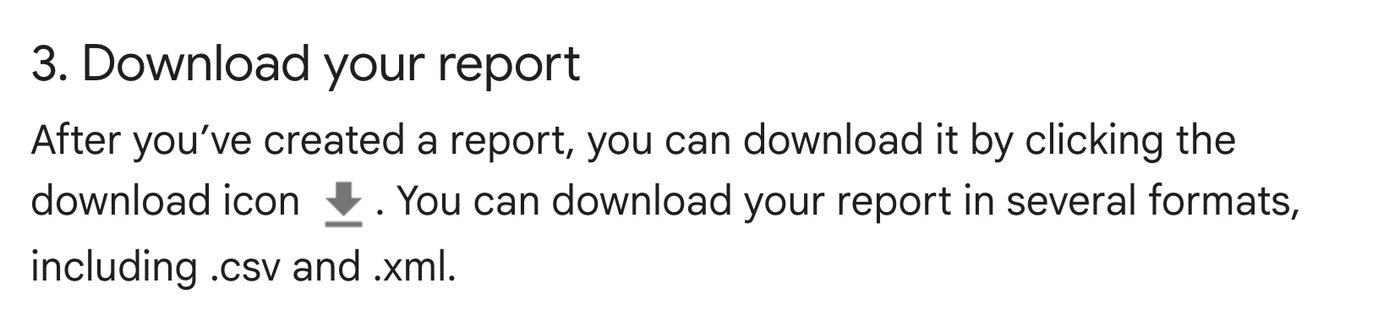
Google's own Report Editor guide has the steps. In your account, click the Campaigns icon, then Insights and reports, then Report editor. Build a table with campaigns as the rows and the metrics you care about as the columns: cost, clicks, conversions, conversion value. Then click the download icon and pick .csv.
Pull a second file while you're in there, because it matters more than the first for finding waste. The search terms report lives under Campaigns, then Insights and reports, then Search terms. It shows what people actually typed before they clicked your ad, and Claude Ads won't suggest a single negative keyword without it (negative keywords are the terms you tell Google never to show your ad for). That's a deliberate rule in its Google instructions: no search terms report, no negative keywords, and no generic starter list as a workaround either.
How do you export from Meta Ads Manager?
Meta's works the same way. In Ads Reporting, set the date range and the breakdown you want, then click the export icon. Meta's help page lists the options as XLSX with formatting, XLSX raw data, CSV or PNG. Take CSV.

Two habits make the Meta audit better. Export at the ad level if you want your creative checked, since a campaign-only file gives it nothing to judge creative on. And keep the same date range as your Google export. The skill refuses to add Meta's conversions to Google's when the two count on different windows, and it'll put them side by side instead until the definitions match.
What's the one command?
Put the export somewhere easy to find, open Claude Code, and type the audit command with the file's path after it. On a plugin install that looks like this:
/claude-ads:ads audit google ~/Downloads/google-campaigns.csvOn a manual install it's /ads audit google with the same path. Swap google for meta to audit the Meta file, or use all when you've exported both. You can also drag the file straight into the Claude Code window, which drops its path in for you.
Before it starts, it'll ask what it can't read from the file: your objective, what counts as a conversion, your monthly spend and your target cost per acquisition or return on ad spend. Those answers change what counts as waste, so they're worth giving properly. The finished run lands in a folder called .claude-ads/runs/ with the raw JSON, an action plan and a readable report.md, plus HTML and PDF versions if your machine has the libraries for them.
How do you read the report it hands back?
This is the part the reel promised, so it gets the most room. The report reads top to bottom in four layers, and the order matters.
The scores, and how much to trust them
The top of the report gives you two numbers that live separately on purpose. Health score is how the account did on the checks it could run. Evidence coverage is how many of the checks it could actually run with the data you gave it. At 80% coverage or more the score counts as graded, between 60% and 79% it's provisional, and under 60% the report calls it insufficient evidence instead of pretending.
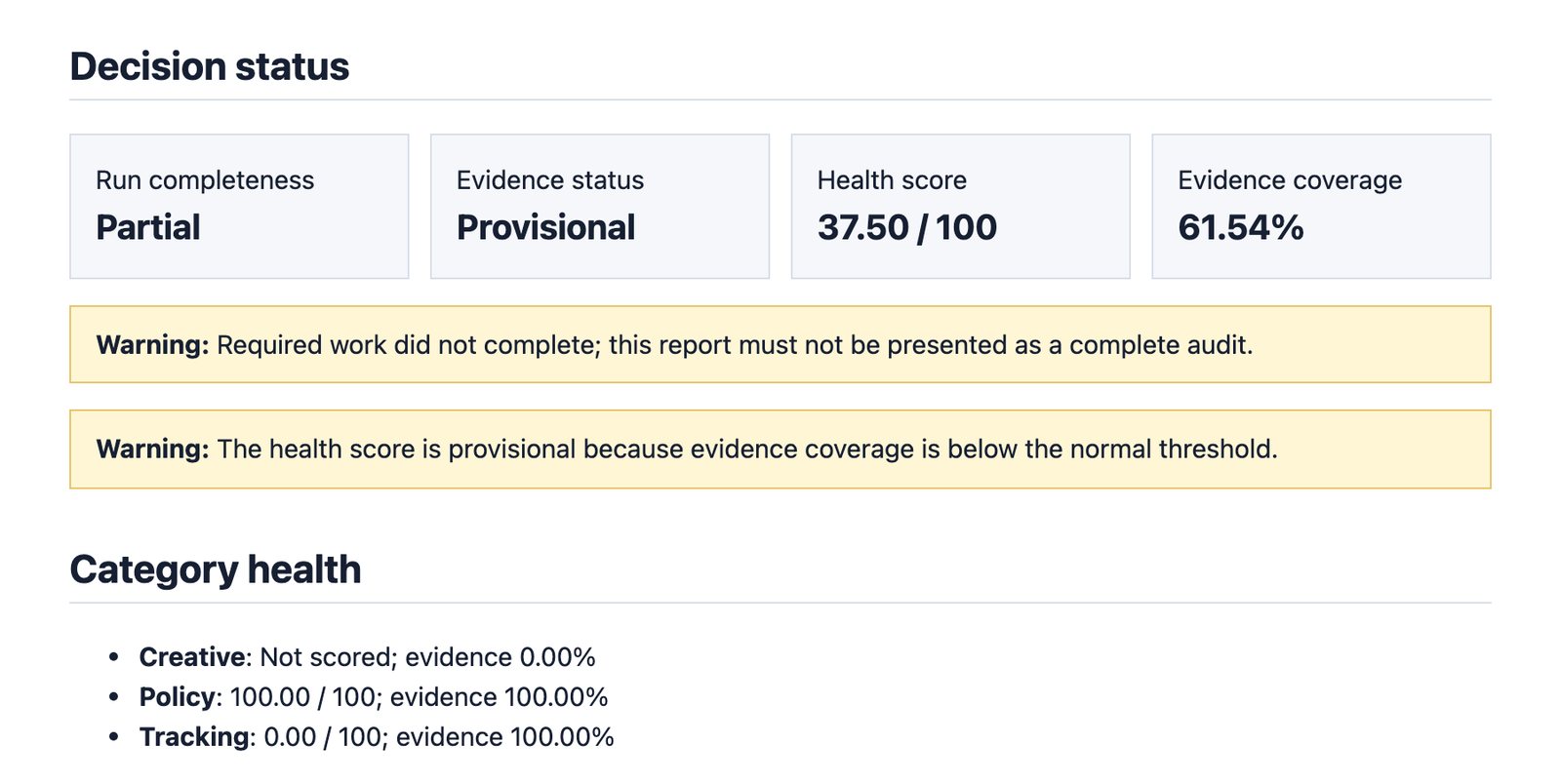
The sample shows why that split is useful. Northstar Demo scores 37.5 out of 100, but its export had no creative rows, so creative wasn't scored at all and coverage sits at 61.54%. One of its checks also failed to finish, and the report says in plain words that it must not be presented as a complete audit. I'd rather have a tool that tells me its own score is shaky than one that rounds a half-finished check into a confident grade.
Each finding, with the data line behind it
Every finding below the scores follows the same shape: severity, confidence, what kind of source backs the check, what it observed, what it thinks that means, what to do, and then the evidence itself.
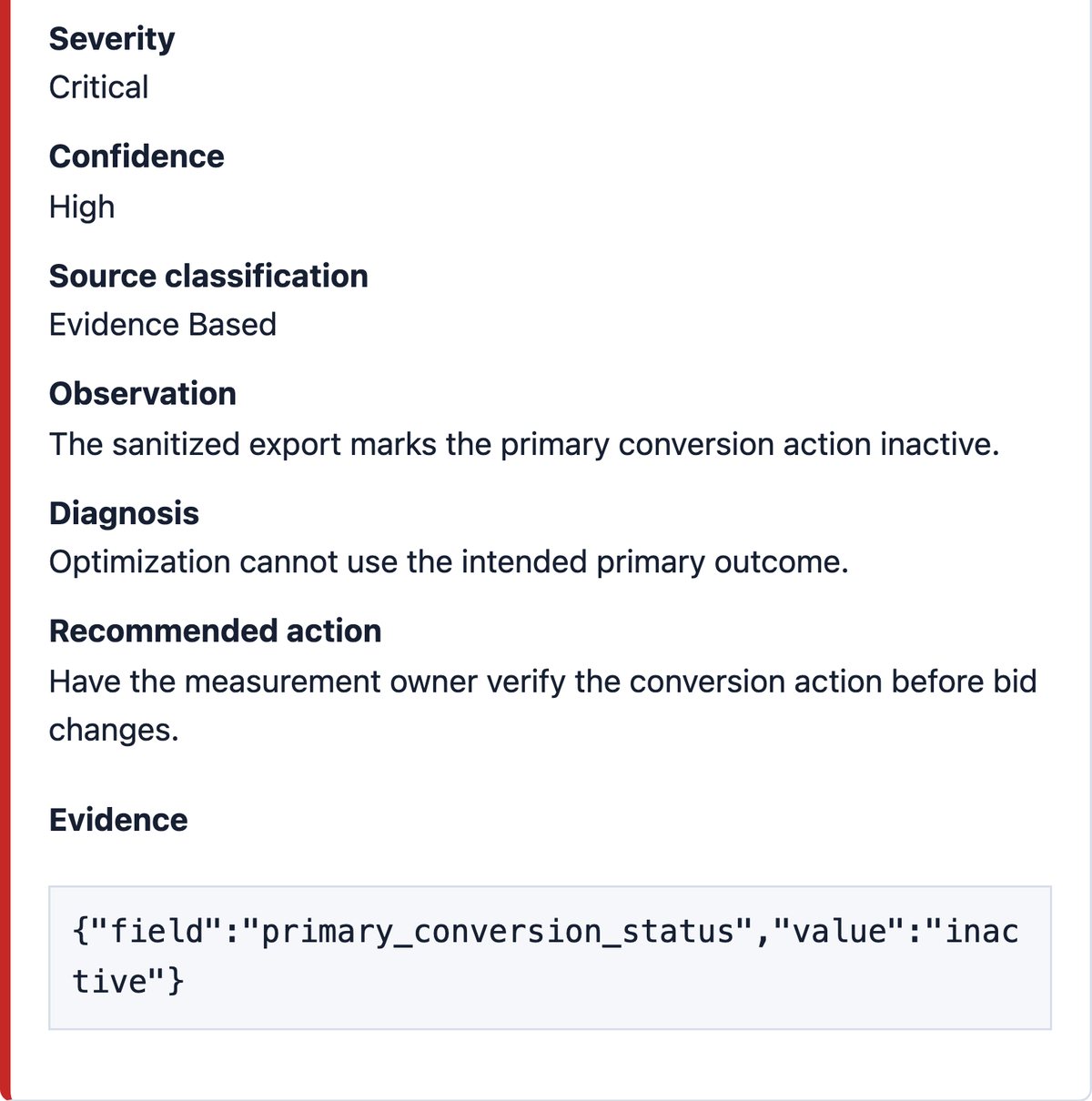
That evidence block is what I'd check first on every finding. In the sample, the field is primary_conversion_status and the value is inactive, so you can open your own export, find that column and confirm it in ten seconds. If a finding has no evidence, it's marked unknown with no confidence, which is exactly what happened to creative in the sample.
What it calls waste, what it says to pause, and what it says to scale
Waste, on Google, comes out of the search terms and keyword checks: spend on search terms that have nothing to do with your business, keywords that keep spending without converting, and how long it's been since anyone reviewed the search terms at all. On Meta it leans on tracking, creative fatigue, audiences and placements. Either way, a waste call should point at real rows in your export.
Pause is where it's more careful than most people expect. Its budget rules say not to pause something just because its cost per acquisition crossed a fixed multiple of your target. It checks conversion lag first, meaning the delay between a click and the sale it eventually turns into, then tracking outages, small samples, lead quality and seasonality. The cases where it does recommend stopping straight away are a runaway-spend ceiling you've set, a policy or legal problem, a broken landing page, confirmed tracking corruption or delivery nobody authorised, and even then it reaches for the smallest change it can reverse.
Scale has the highest bar. It'll only draft a budget increase when six things are true at once: the conversion data has matured past its lag, tracking and the landing page are healthy enough to trust the result, the numbers sit inside the economics you approved, the campaign is eligible for the change, the business can absorb a wobbly week, and there's a before and after measure with a rollback trigger. The rules end on a line I agree with: no universal percentage is safe.
The action list at the bottom
The report closes with contradictions it couldn't settle and a numbered list of actions, each with an owner, a timing, a confidence level and a measure of success.
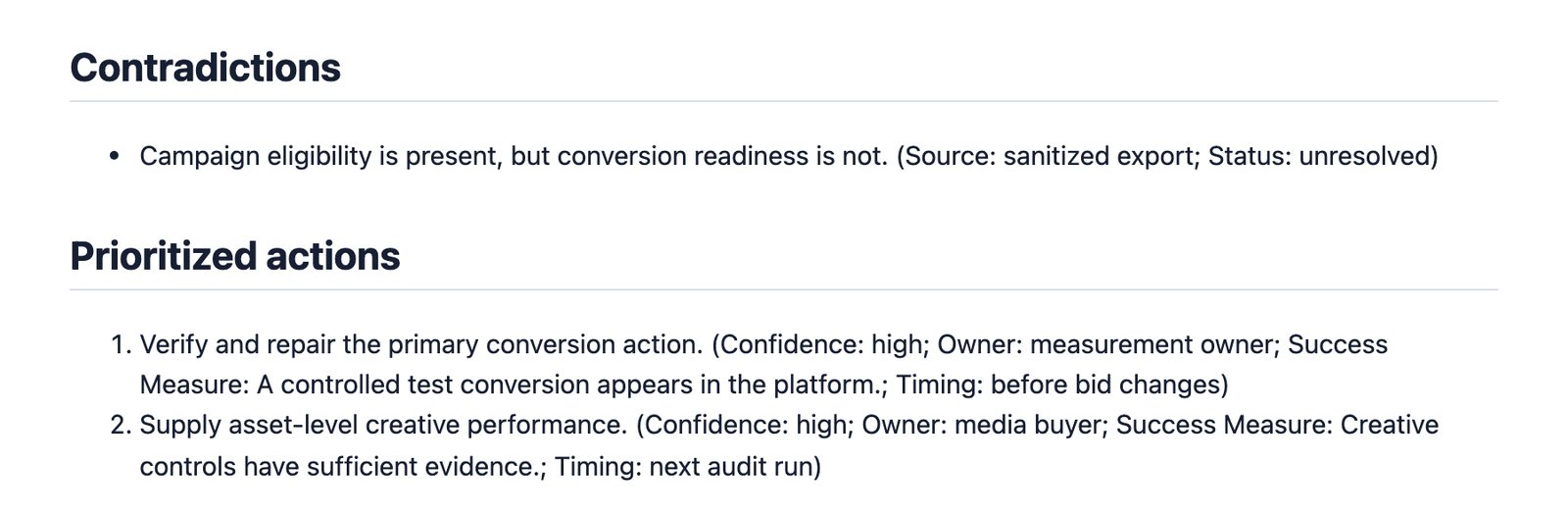
In the sample, the first action is to fix the conversion action before anyone touches bids, and that ordering is right. Bidding on a broken conversion signal is how a lot of the slow waste starts.
Can Claude Ads change your ad account?
Not from an export, because a CSV on your laptop has no connection back to Google or Meta. The project also supports reading an account directly if you authorise it, and there the README says it's read-only by default. A live change needs six things before it goes through, including a readable before and after, the owner's approval within limits the account has set, and a rollback plan. Version 2 refuses to permanently delete anything, even if you confirm it.
What annoys me about it, and who should skip it
The setup is the first thing. If you've never opened a terminal, getting Claude Code installed and a plugin added will take longer than the audit does, and there's no phone version.
The second is that it's only as good as the export. A thin campaign-level file gets you a provisional score full of unknowns, which is honest but can feel like it did less than you hoped. Its caution on pausing will also frustrate anyone who wanted a blunt list of five campaigns to kill.
I'd skip it if you spend so little that one look at Ads Manager tells you everything, or if you already pay someone who walks you through the search terms every month. It's for the gap in between, where money's going out and nobody's reading it line by line.
How it fits with Meta's own Claude connector
Claude Ads and Meta's connector do different jobs, and I'd use them in that order. The audit comes first, from exports, where nothing can change. Once you know what you want changed, Meta's own Claude connector is the official way to let Claude make those changes in a Meta account, with your approval on each one. On Google, the audit hands you the list and the changes are yours to make in the account.
FAQ
Is Claude Ads free?
Yes. Claude Ads is MIT licensed and free to install from GitHub. What costs money is Claude Code, which needs a paid Claude plan such as Pro, since the free Claude plan doesn't include it.
Can Claude Ads make changes to my Google Ads or Meta account?
Not when it works from an exported report, because the file has no connection back to the account. With direct account access it's read-only by default, and a change needs owner approval, a before and after diff and a rollback plan before it goes through.
Which ad platforms does Claude Ads audit?
Claude Ads covers 12 platforms: Google Ads, Meta, YouTube, LinkedIn, TikTok, Microsoft Advertising, Reddit, Snapchat, X, Apple Ads, Amazon Ads and Pinterest. YouTube gets its own score even when the data comes through Google Ads.
Do I need Claude Code to run Claude Ads?
Claude Code is the runtime the developer builds it for, and the plugin install happens inside it. The README says other agent tools such as Codex, Gemini and Cursor can load the same skill files where they support them, but Claude Code is the main path.
Who made Claude Ads?
Daniel Agrici, who publishes as AgriciDaniel on GitHub and also built the free Claude SEO audit skill. The project had 9,743 stars as of 6 October 2026.
Why I'd run this before paying for an audit
When I ran ads for a client, the expensive mistakes were almost never strategy. They were small things that sat unnoticed for weeks. What I like here is that every finding has to show its row before it's allowed to make a claim, so I can argue with it the way I'd argue with an agency's report, only without the invoice. I'd still want a person deciding what to do with the list, but I wouldn't pay anyone just to produce it any more.